There are several ways to recover lost access to your Bitcoin wallet. One of these is specialized software that leverages cryptography and data recovery techniques to help the user regain access to a previously inaccessible Bitcoin wallet. These are called Bitcoin wallet recovery tools, with notable examples including Bitcoin2john, John the Ripper, and Hashcat.
The good news about these tools is that many of them are open source. You can download and access them for free don’t need to be a data expert to use them. Anybody comfortable enough in technical situations should be able to find their way around one of these tools.
However, there are a few things you need to know about Bitcoin recovery software before you can use them.
When to Use Bitcoin Wallet Recovery Tools
Like any other tool, Bitcoin wallet recovery tools have an appropriate use. They can only be used in certain situations, typically those involving your wallet’s seed phrase and passphrase.
Seed Phrase in the Wrong Order
The seed phrase serves as proof of ownership of the wallet and is cryptographically linked to the wallet’s public and private keys. It can be used to recover (make working copies of) the wallet.
When a wallet’s seed phrase is generated, it is given to you in a specific order. If you ever need to restore or make a copy of the wallet, you’ll need to use the phrase in this specific order.
However, due to the large number of words involved, people often mix up the sequence. While they have the correct seed phrase, it’s in the wrong order, which pretty much renders it invalid.
Fortunately, a wallet recovery tool can help remedy this situation. The tool will use your wallet’s cryptographic keys plus the disordered seed phrase to find the correct sequence of words.
Troubleshooting an Invalid Seed Phrase
Arranging words in the wrong order is just one way to render your seed phrase invalid. The phrase will also not work if it has a wrong word in there, is incomplete, i.e., there is a missing word(s), or there is at least one wrongly spelled word.
While the latter issue is usually easy to spot, it becomes more challenging when there are homophones involved. These are words that sound similar but have different spellings, like cell and sell, bare and bear, etc. It’s also a challenge with words that are spelled differently in different English dialects, like neighbor and neighbour, harbor and harbour, etc.
A wallet recovery tool can be handy in situations like the ones above. However, success depends on the extent of the problem. Generally, the fewer missing or wrongly spelled words there are, the easier it will be for the tool to correct your seed phrase.
Forgotten Passphrase
Core wallets and other wallet applications use an extra layer of protection called a passphrase, which is a word or phrase used to access the wallet. For hardware wallets, this is used to create hidden wallets. To access a hardware wallet with this setup, you’ll need your complete seed phrase and the passphrase, which is a problem if you lose the latter.
Bitcoin wallet recovery tools can be used in this scenario. As in the previously mentioned scenarios, the tool uses whatever information you have, namely the seed phrase and the wallet’s cryptographic keys.
Situations Where Tools Are Useless
There are instances where a recovery tool offers little help. In such cases, you will need to find another solution to help you regain access to your bitcoins. They include:
- Corrupted files: Your wallet’s files can get corrupted by a virus, causing it to misbehave. To fix this problem, you’ll need to remove the virus from your phone/computer before restoring the wallet. Wallet recovery tools are not virus cleaners and will be useless in this situation.
- Restoring wallet.dat: Wallet.dat is a crucial file in Bitcoin Core that contains private and public keys. Your core wallet cannot work without this file. So, if it is damaged or corrupted, you will need to restore an intact version of the file. This doesn’t require any tools. Instead, you’ll need to have a backup of the file.
- Hardware failure: Hardware failure can result from water damage or physical damage to your hardware wallet or the device that hosts your software wallet. In this case, it may be possible for an expert to recover data that can then be used to restore your wallet.
- Syncing problems: Bitcoin wallets sometimes experience syncing issues. The result is an incorrect wallet balance and an outdated transaction history being displayed. Depending on the type of wallet you’re using, a fresh install is enough to fix the problem. The Bitcoin Core Wallet also supports some commands that will let you dump your keys.
- New Computer: If you’re just transferring your wallet to a new computer, you only need your seed phrase to restore it. If this is missing, you can use a backup of wallet.dat (if you have one) or a keystore file. The file contains the private and public keys needed to restore a crypto wallet.
Bitcoin Wallet Recovery Tools and How to Use Them
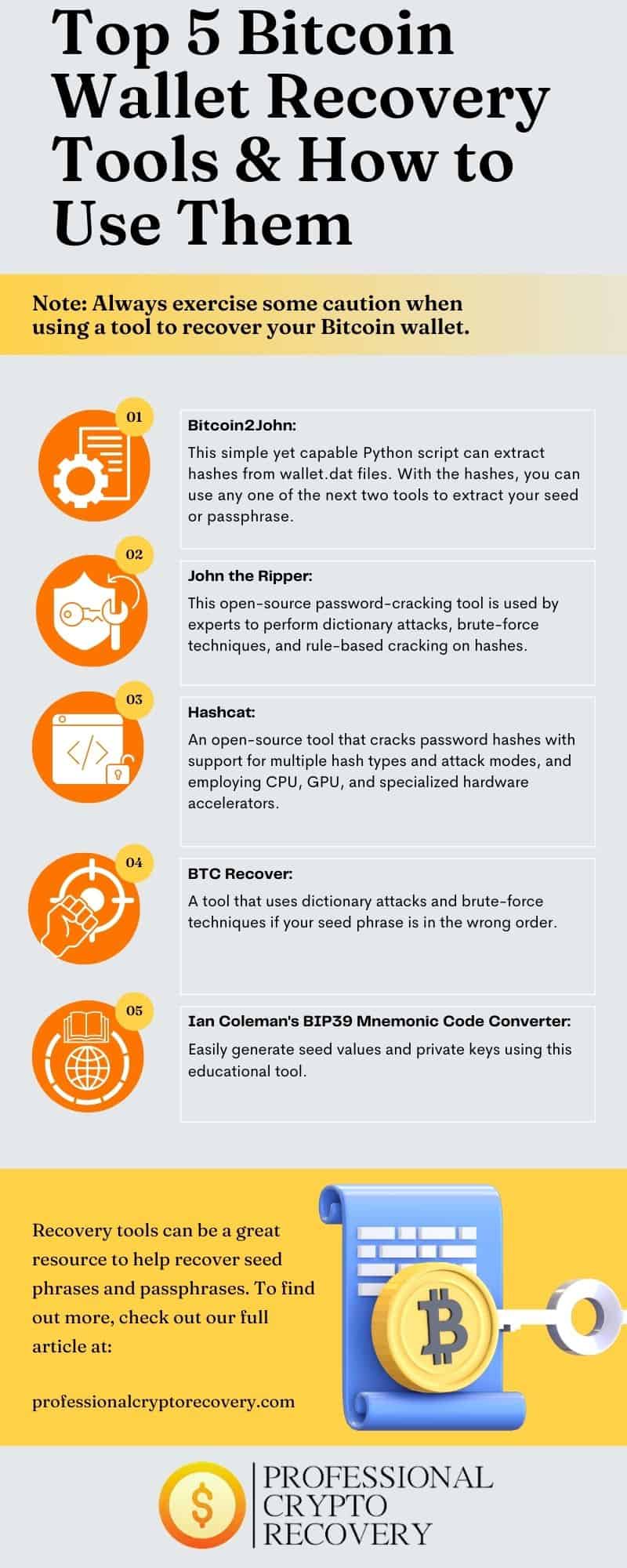
Bitcoin2john, John the Ripper, Hashcat, BTC Recover, and Ian Coleman’s BIP39 Mnemonic Code Converter are some good recovery tools available for free on the internet. Here’s a closer look at each one of them:
Note that due to the sensitive nature of the data involved, you’ll have to exercise some caution when using a tool to recover your Bitcoin wallet. One way to ensure absolute security is to perform the recovery process on an airgapped computer. This is a device that is completely disconnected from the internet and other devices.
Bitcoin2John
Bitcoin2John is a small, open-source Python script that can be used to recover Bitcoin wallets. It is a fork of Pywallet, a Python-based open-source utility project that provides tools and functionality for interacting with Bitcoin wallets.
Bitcoin2John works by extracting the hash from a Bitcoin Core’s wallet.dat file. These hashes are then passed through another tool, such as Hashcat or John the Ripper, which attempts to extract the passphrase or seed phrase.
John the Ripper
John the Ripper is a popular open-source password recovery tool. It uses a variety of attacks to crack passwords, including dictionary attacks and brute-force attacks, and supports various hash algorithms, including Bitcoin’s own BIP39. It’s a suitable tool for recovering an invalid, disordered, or incomplete seed phrase.
Hashcat
Hashcat is another popular password-cracking tool that has been used for Bitcoin wallet recovery. The tool uses a variety of attacks to crack password hashes.
It also leverages GPU computational power to accelerate password cracking and supports other specialized hardware accelerators. You’ll need specialized hardware to fully utilize its speed.
BTCrecover
BTCrecover is an open-source Bitcoin recovery tool. It is designed to help users recover their lost passwords and passphrases. The tool works with wallets that use the BIP32 and BIP39 hash algorithms. It uses dictionary and brute force attacks to systematically try different combinations until the correct seed or passphrase is found.
Ian Coleman’s BIP39 Mnemonic Code Converter
Ian Coleman’s BIP39 Mnemonic Code Converter is a popular tool for recovering Bitcoin wallets. It was developed by Ian Coleman and works by converting BIP39 mnemonic phrases into their corresponding private keys and seed values.
Sometimes It’s Better to Let the Pros Do the Work
Bitcoin wallet recovery tools are a viable option for recovering your wallet, especially if you’re having issues with its seed phrase or passphrase. These tools can recover a seed or passphrase using a variety of cryptographic and password-cracking techniques.
However, there is no guarantee that they’ll work. This means you might have to turn to a Bitcoin wallet recovery service, such as Professional Crypto Recovery (PCR).
PCR is a data recovery company that helps people recover their cryptocurrencies swiftly and affordably. Contact us to book a free consultation.