
Armory is a well-known Bitcoin wallet, but unfortunately, it’s also rife with issues.
If you’ve ever run into technical issues with Armory, you’re not alone. There are several fairly common problems that tend to crop up with this wallet, and this can be frustrating and scary when it comes to accessing your funds.
The good news is that the issues with Armory are easily fixed. In this guide, we’ll show you some of the most common real-world Armory wallet issues and how to solve them.
If you’re looking for a full guide on Armory wallet recovery, we have one here.
Common Armory Wallet Issues New Users Face
Armory was one of the most established and secure wallets available for crypto users, famous for its air-gapped cold storage system, which allowed users to create and sign wallets entirely offline and send transactions without ever exposing their private keys to the internet.
However, Armory hasn’t been updated for many years. It’s no longer a great choice for keeping your crypto assets safe, and there are many better options on the market today.
Here are some of the most common problems people tend to run into:
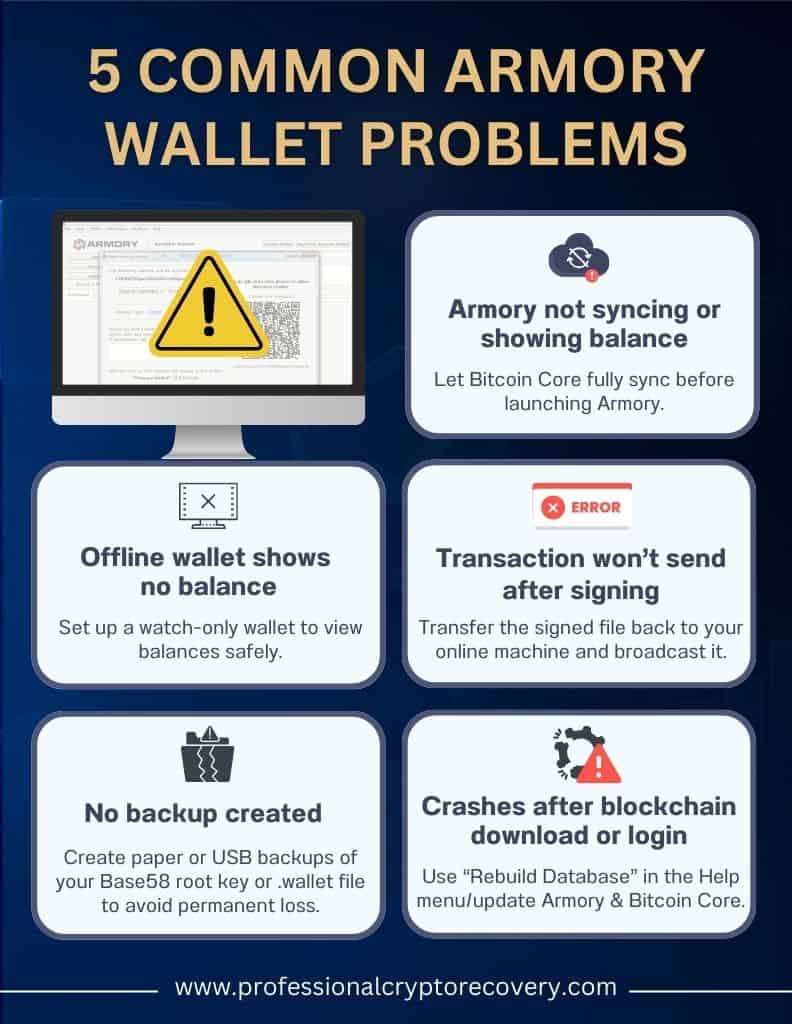
- Armory requires a fully synced Bitcoin Core node to work. Many users fail to realize this, and install Armory without letting Bitcoin Core fully download, which prevents balances from updating and transactions from broadcasting
- Some users misunderstand cold storage (offline) wallets and expect Armory to show information about balances and transactions. This is impossible with an offline Armory wallet and requires extra steps like setting up a watch-only wallet.
- Users often fail to create paper backups, USB backups, or recovery phrases. Skipping these steps puts you at risk of losing access to your funds if your computer crashes or files become corrupted.
- Signing transactions in your offline wallet isn’t enough to send a transaction. You need to transfer signed Armory wallet transactions back to the online machine and then broadcast them through the network.
- Using outdated versions of Armory Bitcoin Core can result in crashes or compatibility issues
I Have Set Up My Offline Wallet – Where Is My Balance?
So you’ve set up your offline Armory wallet, but there’s a problem: you can’t see your balance.
This is normal. It happens because offline wallets (as the name suggests) aren’t connected to the internet, which means they’re unable to query the blockchain to get up-to-date information on your balance.
Here’s how to fix it and get your Armory wallet online. You need to set up a watch-only wallet that’s synced with Bitcoin Core. This is fairly straightforward, and you can learn how to do it in Armory’s video here. This wallet contains your public keys and addresses, but not your private keys, so you can safely sync it with Bitcoin Core. Once done, you’ll be able to see incoming transactions and balances.
Sometimes your balances might still not show up after syncing. If this happens, try rescanning or re-importing the wallet. This forces the software to re-check the blockchain for any missed transactions.
I Can’t Send Transactions Using My Armory Wallet
Another common Armory Wallet issue people run into is being unable to send Bitcoin to others. Given that this is one of the main functions of a crypto wallet, it’s understandably frustrating.
This problem usually has one of three main causes. Here they are, along with solutions:
- Bitcoin Core isn’t fully synced, so Armory can’t broadcast transactions. In this case, you’ll need to check Bitcoin Core and confirm your node is fully synced.
- The database is corrupted, which prevents Armory from creating transactions. If you suspect this might be the issue, use Armory’s Rebuild and Rescan Database feature from the Help menu.
- You may be signing the transaction offline, which isn’t enough to actually send the transaction. To fix this, you need to create an unsigned transaction on an online machine, move the file to an offline machine to sign it, and then bring it back to the online machine to broadcast the transaction.
System Clock Setting Issues
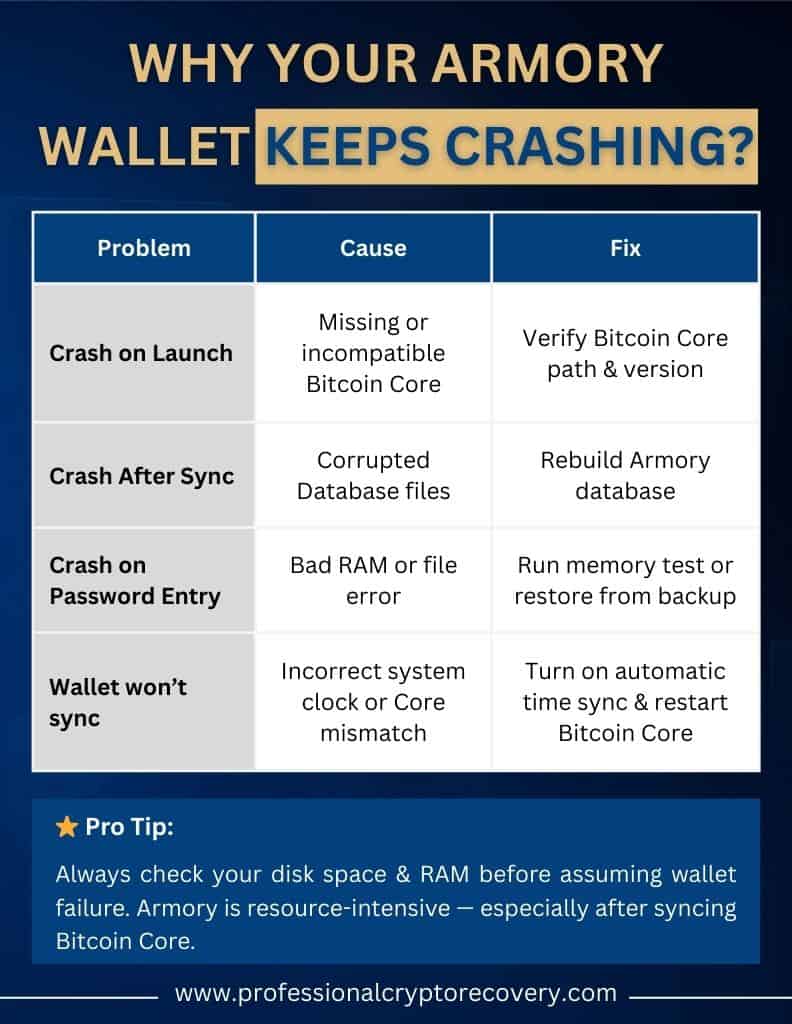
Is your Armory wallet not syncing? If your computer’s internal clock is incorrect, even by a small amount, it can prevent Armory and Bitcoin Core from verifying blocks and transactions. This can cause Armory wallet issues like freezes and sync failures.
To solve this problem, go to your operating system settings and turn on automatic time synchronization. Then restart Bitcoin Core and Armory. In some rare situations, you might also need to clear temporary files or rescan the blockchain for full sync.
Armory Crashes After Completing Blockchain Download
Sometimes, Armory crashes after downloading. Usually, this happens because of two main reasons:
- The database files that Armory uses were damaged or corrupted at some point during the syncing process
- Armory has failed to notice that Bitcoin Core is fully synced
One potential solution here is to run the Rebuild Database feature from Armory’s Help menu. You can also simply restart your system and reopen Armory to see if it detects Bitcoin Core correctly this time.
Another option is to check available disk space. Armory and Bitcoin Core are both pretty resource-intensive and can crash if there’s insufficient disk space. Freeing up some space can solve the problem.
Armory Crashes Every Time I Type in My Password
One of the most hair-pullingly annoying Armory Wallet issues you can run into is when it crashes immediately after you enter your password. Most of the time, this happens because there’s a corrupted wallet file or because you’re running an outdated version of the software.
Luckily, like all the issues on our list, it’s fixable. You can try updating to the most recent version of Armory and Bitcoin Core in case your current version is outdated.
You can also try the Rebuild Database feature again, which can solve the problem if it’s caused by corruption.
In a few rare cases, this issue might be a result of hardware problems like bad RAM, which can cause Armory to crash during decryption. You can run a memory test to rule out this issue or find out what to do next.
How Can Professional Crypto Recovery Help With Armory Wallet Issues?
The information in this article should be enough to help you deal with most basic Armory wallet issues.
Unfortunately, not all issues are basic, and sometimes you’ll need to enlist the help of an expert.
At PCR, that’s our job. We help Armory users with more complex and difficult problems, so you can recover the crypto assets trapped in your wallet.
Get in touch with us if you have a problem with your Armory wallet recovery and need help accessing your funds.
Frequently Asked Questions: Fixing Your Armory Wallet Issues
Is the Armory wallet safe?
Armory used to be a great option, but it hasn’t been updated since 2018 and has a number of issues. It’s best to use a more well-maintained wallet like Coinbase Wallet or Ledger.
Why is my crypto wallet not working?
There are lots of reasons why your crypto wallet might not be working, or why you might be having trouble accessing your crypto. Some common examples are connectivity issues, corrupted files, and problems with synchronization. If you aren’t sure what’s causing your crypto wallet issues, get in touch with us, and we can help you troubleshoot.
How do you recover access to an Armory wallet?
If you’re having issues accessing your Armory wallet, there could be a number of different reasons for this. You can solve these problems by updating your Armory software, fixing issues with your device, or resolving connectivity problems. If you’re still having trouble, PCR can help you pinpoint the issue and regain access to your crypto.