Crypto.com is one of the biggest cryptocurrency platforms out there, with more than 100 million users around the world. It offers a ton of different services, including a wallet, exchange, and app.
But what happens if you lose access to your Crypto.com account? This can happen for a few different reasons, and it can leave you locked out of your crypto assets and unable to buy, sell, or trade.
The good news is that if you do lose access, there are several Crypto.com account recovery options available to recover your crypto. In this article, we’ll break down the different recovery processes for different Crypto.com services.
Crypto.com Exchange Account Recovery Process
If you find yourself locked out of the Crypto.com exchange, your recovery steps will depend on the nature of your problem. Let’s look at a few potential scenarios.
- If you forgot your password to your web account, Crypto.com asks that you use the app to reset it, so head to the next step.
- If your account has been locked, for example, after several failed logins, you’ll need to confirm your email and follow a series of prompts to verify your identity within the Crypto.com app. It might take several days to unlock your account after verification.
Crypto.com App Account Recovery
Recovering access to the Crypto.com app will involve a slightly different set of processes from the exchange. Again, it depends on your circumstances.
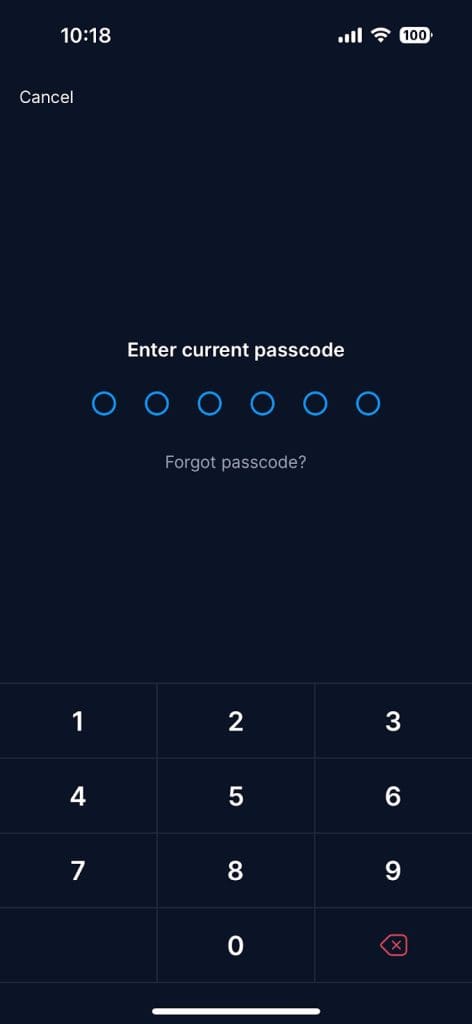
If you forgot your 6-digit app passcode, tap “forgot passcode” on the login screen. You’ll need to verify your identity, usually by receiving an SMS code on your phone and entering your date of birth. Follow the on-screen prompts to reset your password and regain access.
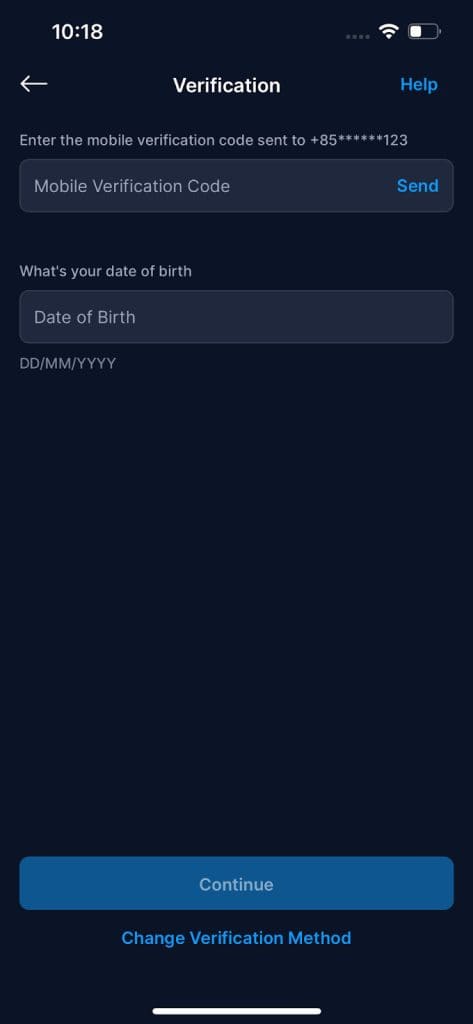
- If you can’t access your registered email or phone, or you’ve changed this information, you need to update it before logging in. On the login page, you’ll find options to recover your email or change your phone number.
- If you forgot your registered email for the Crypto.com app, you can try searching your inboxes for “Crypto.com” or check your saved credentials. If you still have no luck, you can try contacting Crypto.com support through the in-app chat function or help center.
Crypto.com OnChain DeFi Wallet Recovery
Because the Crypto.com OnChain wallet is non-custodial, only you, the user, control the keys. That means the only way to recover access to an OnChain wallet is with your secret recovery phrase.
To restore a wallet on a new device or app install, open the Crypto.com OnChain app and choose “Import an existing wallet”. Set your new password, and then enter your full recovery phrase and tap “Restore”.
If this doesn’t work, or if the Restore button is disabled, double-check your recovery phrase. Remember, the words need to be in the correct order and spelled correctly.
If you don’t have the recovery phrase, there’s no way to recover your funds. To avoid this problem, be sure to back up your phrase securely. Write it down and store it in more than one physical, offline location, like a safety deposit box.
If you try to restore your wallet and get an invalid seed phrase error, or your accounts don’t show up, it may be time to contact a professional. At PCR we can help you if you run into this issue.
Common Reasons Why Crypto.com Users Lose Access
To avoid losing access to your Crypto.com accounts, it helps to know the main problems people typically run into here.
- Forgetting your Crypto.com password. In this case, you can try the “Forgot Password” option at the login screen to send a reset email. In the app, you’ll verify via SMS by sharing your date of birth.
- If you lost or changed your phone, you can no longer receive SMS codes. In the app, you can use the “Change Phone Number” process to update your details here.
- If you deleted or lost your authenticator app for two-factor authentication, you’ll need to contact Crypto.com support to disable 2FA and provide identity proof to reset this feature.
- If you lost or changed your email address, you’ll need to contact support via the in-app chat and verify your identity to update your email information.
- You might have reset your phone or uninstalled your app without backing up data. In this case, you need to log in as usual on the new install. For the OnChain wallet, you’ll need to enter your recovery phrase.
- Your account might have been locked, for example, if you entered the wrong credentials too many times or triggered anti-fraud measures. If this happens, follow the on-screen prompts to verify your identity or contact support.
How to Reset 2FA on Crypto.com
A lot of users run into challenges when resetting two-factor authentication on Crypto.com. The solution here depends on which platform you’re using.
How to Reset 2FA for Crypto.com: Step 1
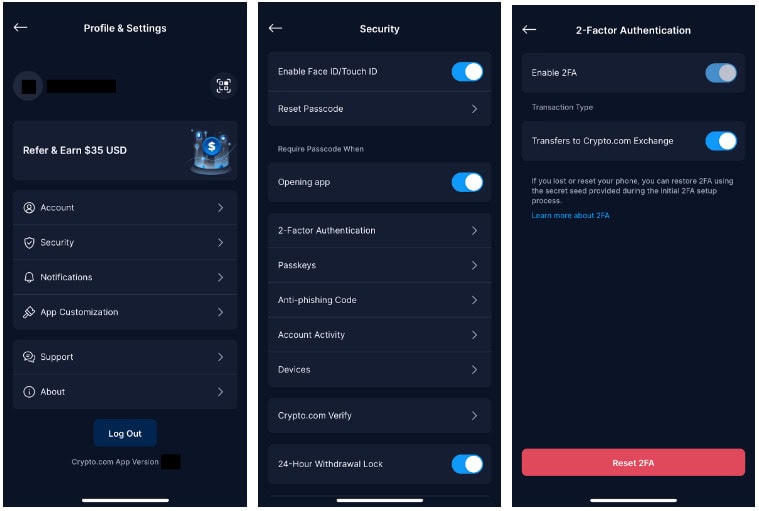
In the Crypto.com app, you need to go to Settings, Security, 2-Factor Authentication, and then select “Reset 2FA”. You’ll need to verify your identity. Use your passkey if you have one, or your current passcode and existing 2FA code. You may have to verify your identity another way, for example, by recording a video.
How to Reset 2FA for Crypto.com: Step 2
After verifying, you’ll set up a new authenticator by scanning a QR code or entering a code manually. Once completed, remove the old key from your authenticator app and re-enable 2FA with the new key.
How to Reset 2FA for Crypto.com: Step 3
In the Crypto.com exchange, go to Settings, Security, Account Password & 2FA, and toggle off 2FA. You’ll need to provide an email OTP and your current authenticator code. If you don’t have this, contact support. You’ll need to provide another verification video showing you and your ID. Once the team disables 2FA, go to settings and re-enable it with a fresh code.
Reaching Out to Crypto.com Support for Different Issues
Sometimes, you may need to contact Crypto.com support to help you with account recovery issues.
The simplest way to do this is through the in-app chat (go to “Help” or visit chat.crypto.com). You can also refer to the Help Center or use email (be very careful to verify the address) or social channels.
Here’s how to make the process smoother and safer:
- Have your account details, like registered email, phone, and user ID, at hand
- Provide a clear, concise description of your problem
- Be ready to verify your identity in a video if needed. Crypto.com will usually ask for a short video of you saying today’s date and showing the ID you registered with
Remember to be patient, as support can take a while. Give as much information as you can, including any screenshots or error messages that might help. Mention any fixes you’ve already tried.
Never share your password, 2FA codes, or private keys with anyone. Crypto.com staff will never ask for this information, and it’s a huge red flag if somebody does.
How Can Professional Crypto Recovery Help With Your Crypto.com Account Recovery?
If you’ve tried all the above steps and you’re still struggling to recover access to your Crypto.com accounts, it might be time to turn to a professional.
At Professional Crypto Recovery, it’s our job to help you regain access to your wallets and assets. Get in touch with us to learn more about how we can help you with your Crypto.com account recovery.
Frequently Asked Questions
How do I reset my Crypto.com password?
If you forgot your Crypto.com password or app passcode, follow the on-screen prompts to reset it. If you’re having trouble, you may have to contact support.
What should I do if I lose my 2FA device or delete my authenticator app?
You’ll need to follow the instructions in the platform to reset your information. You may need to verify your identity via a video.
Can I recover my Crypto.com account without access to my email or phone?
Yes, you’ll need to log into your Crypto.com account on another device and update your details.
Can I recover my Crypto.com DeFi Wallet without the recovery phrase?
No, you cannot recover your DeFi wallet without your secret recovery phrase, which is why it’s extremely important to keep this information safe. If you’re having trouble, a professional service like PCR might be able to help.