
Multisig wallets are an increasingly popular Bitcoin (BTC) storage option, with over 20% of BTC now stored in multisig wallets, up from 15% in 2020. Unfortunately, the Block.io wallet is no longer one of these options.
Block.io is a Bitcoin wallet service launched in 2015 and offers an API of the same name. The API was for developers, but people could also use the platform to store and transact in multisig wallets with BTC, Litecoin (LTC), and Dogecoin (DOGE).
Recently, Block.io has rebranded to Sochain. The rebrand came with some new products, but, most importantly, it saw the discontinuation of others, such as the wallet. So Block.io’s crypto wallet can no longer be used to manage assets.
Ideally, most users transferred their crypto to other wallets before Block.io went out of service. But what about those that didn’t? Well, here is how you can recover your Block.io wallet.
How did the Block.io Wallet Work and What Happened?
At its core, Block.io worked like any other crypto wallet, using a combination of public and private keys to manage assets. But unlike most wallets, all Block.io accounts were multisig, meaning a transaction required multiple signatures to be finalized.
In this case, you needed at least two signatures to withdraw funds, though an account could have up to five. One signature was always in Block.io’s possession, but you could enable up to four additional signatures.
Block.io’s wallet service was discontinued on short notice, leaving many people without access to their coins. Given the company’s limited customer service, affected users need alternative solutions.
Crypto Wallet Recovery Options for Block.io
Recovering a crypto wallet is straightforward most of the time. You just download another wallet, like Exodus or Electrum, and import your keys. But because Block.io is a multisig wallet, a few complications make this option unviable.
Block.io initially provided code to sweep wallets, but that program is outdated, may require paid APIs, and requires you to build the back end yourself. These factors make recovery difficult if you’re not a developer. The other option is to use your recovery document.
Recovery Document
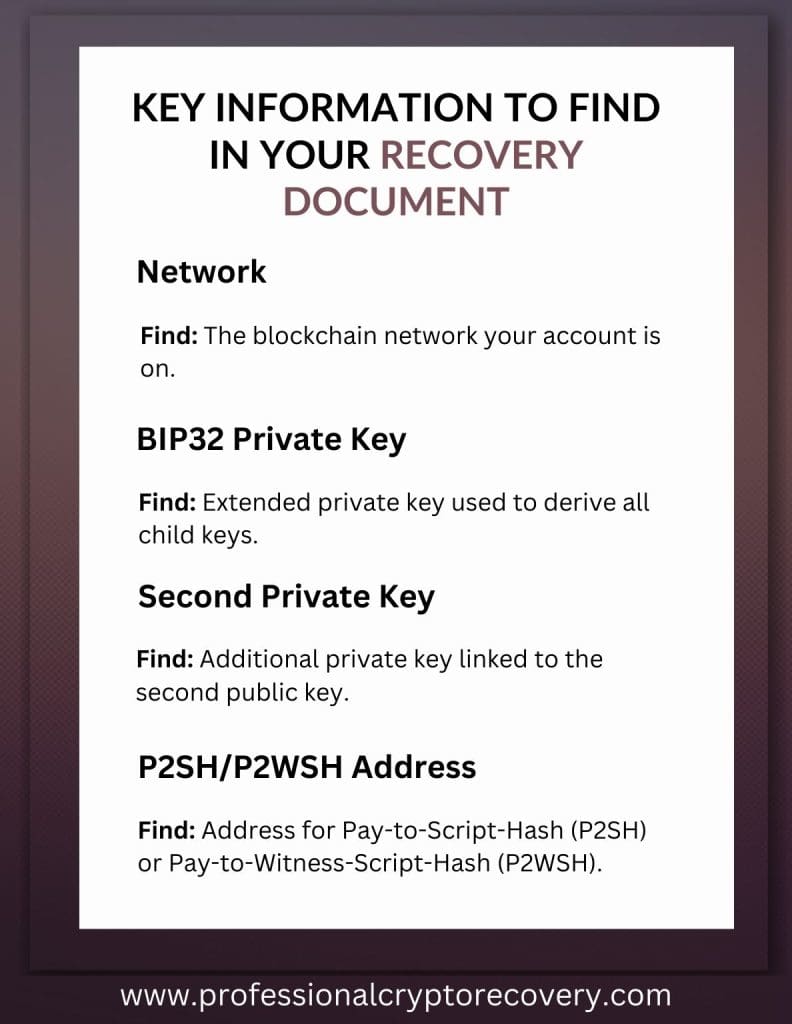
When the wallet was created, Block.io provided users with a PDF containing recovery instructions and tools. It contains a lot of information, so we’ve broken it down to present the data relevant for recovery:
- Network: Blockchain network for the account.
Example: Bitcoin - BIP32 Private Key: An extended private key that can derive all child private keys and public keys.
Example:xprv9s21ZrQH143K36NNa3nK934KWw2Lj4Rty8HTCo8eAXSk5QLfcjeLgRpnaHBJii43yZ2WvNNduqUvtXFNkPeffxGe8Nm7EBVKaTJy2ZEU5T2 - Second Private Key: A second private key associated with the second public key, typically used in multi-signature wallets.
Example:L5dE3h64TR2mKbSJ69Na2fRWbgGSboWnDPXWLSDL8jUyVrtFZFYC - P2SH/P2WSH-over-P2SH/P2WSH Address (i=0): A sample address for a Pay-to-Script-Hash (P2SH) or Pay-to-Witness-Script-Hash (P2WSH) wallet, derived for index i=0.
Example:3F86Fa4au811yuQ7HC1AfGnsGHYM7GEyh9
Here is some other info contained in the document:
- BIP32 Derivation Path: The specific path used to derive child keys from the master key in an HD wallet.
Example:m/i/0 - Redeem Script Format: The script that defines the conditions for spending funds in a multi-signature wallet.
Example:2 BIP32_public_key_for_node_i 02822284fff7ff8a06ecc8e952c851fad8847cad33fdb062ab3b0ff501e6124da3 2 OP_CHECKMULTISIG - Test Redeem Script (i=0): A sample redeem script for testing purposes, showing how funds would be redeemed for index i=0.
Example:2 03c9de2ca61af2ca369a8916c10bcfb9fd4d2c6e41cadaeb8731b8d2548919c355 02822282fff7ff8a06ecc8e952c851fad8847cad33fdb062ab3b0ff501e6124da3 2 OP_CHECKMULTISIG
Block.io Wallet Recovery
Recovering your Block.io wallet will be a complicated process. You can do it yourself with the right skills. But for most people, a recovery expert is the best option. All you have to do is provide them with the right data: your recovery phrase, keys, and the destination address for the recovered assets.
How to Set Up a New MultiSig Wallet
So what comes next after recovering your Block.io wallet? If you still want the enhanced security and control of a multisig wallet, here is how to set up a new one.
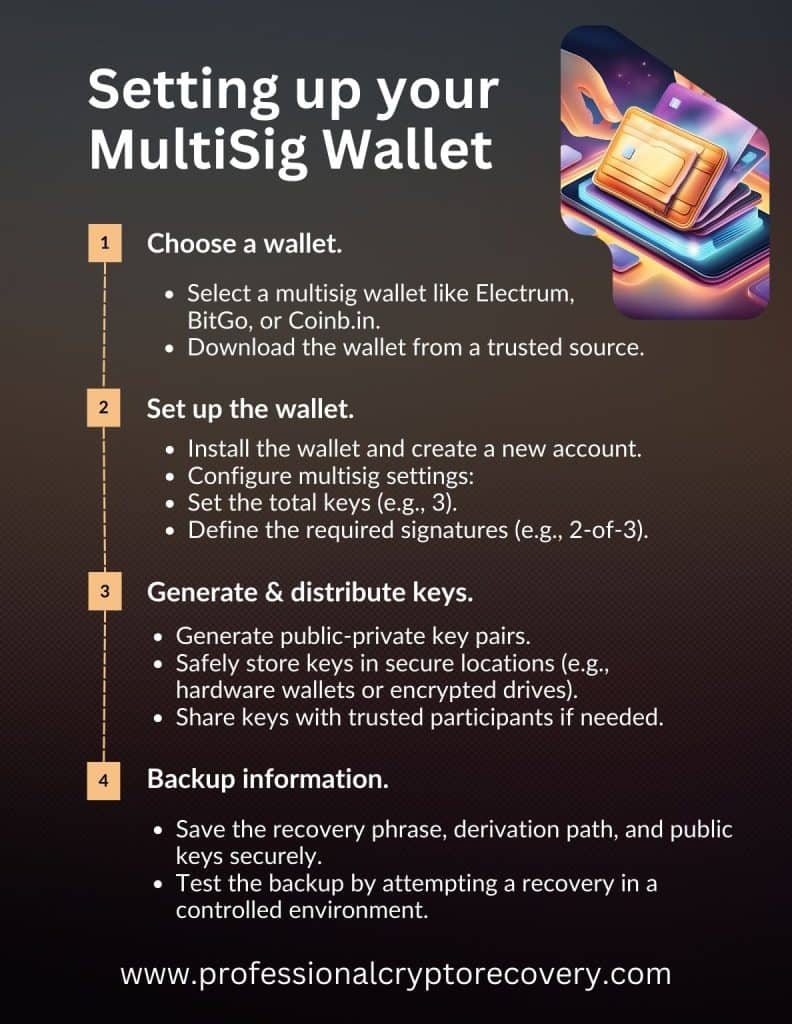
Step 1: Choose Your Wallet
Select a reliable wallet that supports multisig functionality. Some popular options include:
- Electrum: Lightweight Bitcoin wallet with robust MultiSig support
- BitGo: Enterprise-grade wallet with advanced security features
- Coinb.in: Web-based wallet supporting multisig for Bitcoin, with open-source functionality
Step 2: Set Up Your Multisig Wallet
- Download and install: Obtain the wallet software from the official website or app store.
- Create a new wallet: Follow the wallet’s onboarding process.
- Choose multisig settings: During setup, configure the MultiSig parameters by specifying the total number of keys (e.g., 3) and the required number of signatures to authorize a transaction (e.g., 2-of-3).
Step 3: Generate and Distribute Keys
The wallet will generate multiple public-private key pairs. Safely distribute private keys to trusted participants or securely store them across multiple locations/devices.
Step 4: Backup Wallet Information
- Save the recovery phrase (seed phrase) provided during setup in a secure, offline location.
- Document the derivation path and public keys if provided for future reference.
- Test your backup by attempting a recovery in a controlled environment.
Need to Recover a Block.io Wallet?
Block.io’s discontinuation left many users in limbo, unable to access their BTC, LTC, and/or DOGE. But as we’ve demonstrated above, it is possible to recover a Block.io wallet. You just need to find a qualified crypto recovery expert.
Professional Crypto Recovery is a wallet and crypto recovery service run by an expert with 20+ years of experience in IT. With dozens of successful recoveries, including Block.io, PCR gives you the best chance of regaining access to your assets.
Contact us today to get started.
Frequently Asked Questions
Why can’t I use my Block.io multisig wallet?
Block.io recently discontinued its wallet service and rebranded as Sochain. As such, you cannot use your Block.io wallet.
Can I recover my Block.io Bitcoin wallet?
Yes. If you have your seed phrase or recovery document, you can recover your Block.io wallet.
Who can help me recover my Block.io wallet?
Recovering a multisig wallet like Block.io can be complex. Most people need the help of a wallet recovery expert, like Professional Crypto Recovery.