Crypto can be a double-edged sword. Full control over your funds but no safety net. And we’ve all had that sinking feeling of not being able to get into our accounts. We keep typing the wrong password over and over, with predictable results.
While there might not be a customer service number to call, there are ways to recover your cryptocurrency. While some crypto wallets require a seed phrase for recovery, not all do.
In fact, core wallets such as Bitcoin Core don’t even use a seed phrase, and the recovery process looks quite different. This also extends to other core wallets, including Litecoin Core, Dogecoin Core, and Dash Core.
Whether you’re a seasoned crypto guru or just starting, this is your golden ticket to mastering the art of wallet recovery. So, buckle up, because we’re about to turn that roller coaster around.
What Is a Wallet.dat File?
A .dat file is a database file that contains application-specific information. Many applications that you install on your mobile device or computer have a .dat file. The file is created immediately when the application installs. Its content usually changes as you use the program.
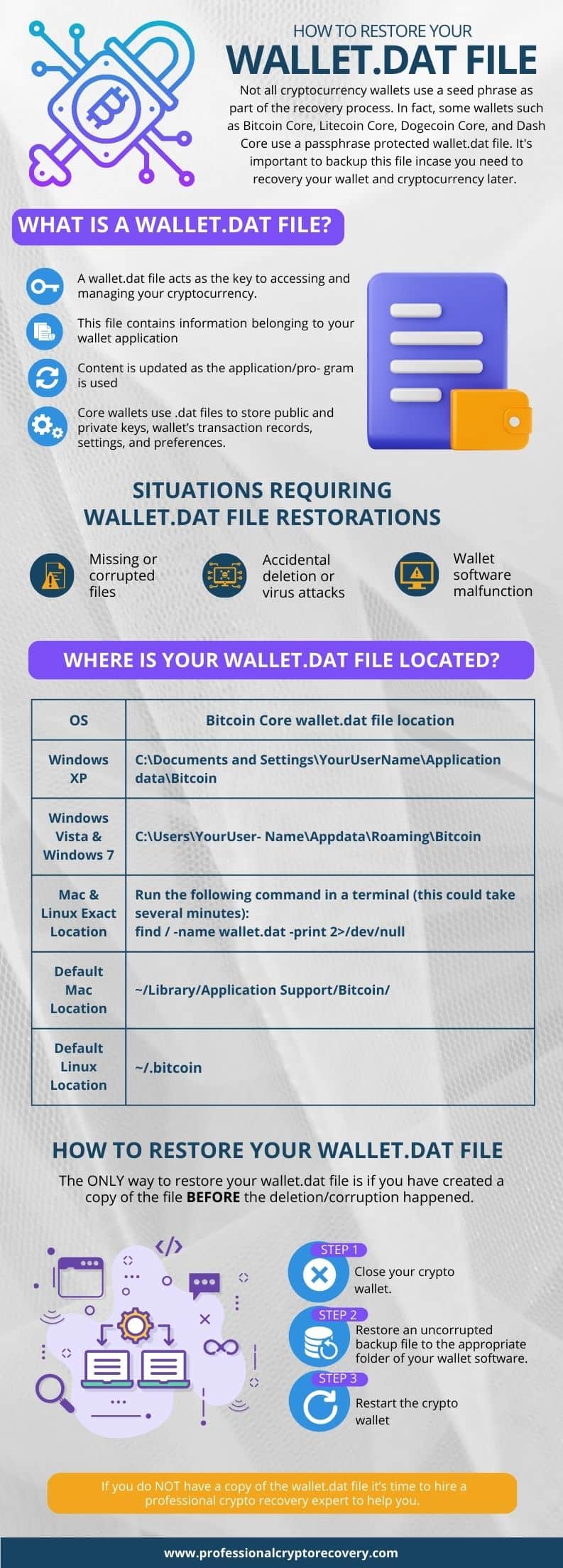
Core crypto wallets use a .dat file, usually named wallet.dat. It contains a variety of information about the wallet. These include the public and private keys. Public keys are the wallet’s address on the blockchain.
Private keys prove ownership of the cryptocurrency funds associated with the wallet. They are also used to sign transactions. As a result, private keys are the most important part of a wallet.dat file.
Other information may include the wallet’s transaction record and the settings and preferences. Once restored, this data helps you recover your cryptocurrency funds.
Core wallets can be encrypted with an optional passphrase. For security reasons, you should use a strong passphrase when using a core wallet. Otherwise, if someone finds your wallet.dat file, they can take over your wallet and move your assets.
When Do You Need to Restore Wallet.dat?
There are several reasons you may need to restore your wallet.dat file.
- Lost/forgotten password: Probably the main reason is that you can’t remember your password or passphrase. This may happen if you’re employing a HODL strategy and haven’t decrypted it in a long time.
- Accidental deletion: Your wallet.dat file is subject to the same problems you might have with any other file on your computer. It’s a relatively rare occurrence, but a huge problem when it does.
- Corrupted or deleted by a virus: If you’re involved in the world of crypto, you probably know that you’re an even bigger target for viruses and malware. When that happens, the wallet will stop working properly, preventing you from accessing the funds associated with it.
The only way to get your core wallet working again is to restore its wallet.dat file.
When disaster strikes, you may find yourself in a position where you need to restore your wallet.dat file. To restore it, you must have a backup. Unfortunately, for many of us, the first time we realize we need it is when our Bitcoin Core app tells us we’re entering the wrong password, or it won’t load at all.
So, don’t get stuck without a backup. If you’re reading this before it’s a problem, learn from other people’s mistakes. Create a copy!
Where is your wallet.dat file located?
Before you can restore or back up your wallet.dat file, you need to find its location on your computer. For Bitcoin wallet.dat recovery here are some common file locations (other coins will be in similar locations):
Windows XP:
C:\Documents and Settings\YourUserName\Application data\BitcoinWindows Vista & Windows 7:
C:\Users\YourUserName\Appdata\Roaming\BitcoinMac & Linux
The best way to find your wallet.dat file on a Mac or Linux computer is to run the following command in a terminal (this could take several minutes):
find / -name wallet.dat -print 2>/dev/nullThe default Mac wallet.dat file will be located here:
~/Library/Application Support/Bitcoin/The default Linux file will be located here:
~/.bitcoinRestoring Your Wallet.dat File
To restore the uncorrupted version of wallet.dat, move your backup file to the appropriate folder for your wallet software. The specific location of the wallet.dat file differs depending on your operating system and the wallet you’re using.
Before moving the backup file, close your crypto wallet to prevent any potential conflicts. Once you move the file, you have restored wallet.dat.
You can then restart the wallet. It will recognize the new wallet.dat file, ask for your optional passphrase, and display the correct wallet balance and transaction history.
What if you don’t have a copy of the wallet.dat file? Or what if you have a copy, but the entire device is damaged, so you cannot restore the file?
Well, that makes the situation more difficult. But it’s not entirely unsalvageable. At this point, you need to find a professional crypto recovery expert. They will then use their data recovery skills to recover the deleted wallet.dat file or restore an uncorrupted version from the device’s internal storage.
Sometimes, this can be done remotely. A recovery expert can guide you through the process of getting the file. It can then be securely sent to the expert, which certainly beats sending your device to them.
How to Backup Your Wallet.dat File
Back up your wallet.dat file regularly. That way, you can easily recover your funds in case of corruption or accidental deletion of the original file.
To do this, locate the wallet.dat file in your wallet’s data directory. You then want to copy the file and paste it into a different location on your computer. An external hard drive can be a good place to store it. Once you have created the backup file, store it in a safe location.
Takeaway
The wallet.dat file is a crucial element of your core wallet. If it gets corrupted or deleted, you will have a hard time unlocking the wallet and accessing your crypto funds. Fortunately, you can quickly get yourself out of this situation if you have a backup of the wallet.dat file.
But if you never backed it up, you’ll need professional help. Professional Crypto Recovery (PCR) has been in the data recovery business for years. So, if you need to recover your crypto wallet, we will help you do so quickly, safely, and affordably.
Contact us today to book a free consultation.