Private keys are arguably the most critical aspect of crypto ownership. Generated to serve as your digital signature, this string of characters controls access to your assets on the blockchain.
Encountering private key issues is something every cryptocurrency holder dreads, as the slightest issue can block access to their tokens on the blockchain.
Understanding private keys, how they work, and how they are formatted is important to any crypto enthusiast. It enables you to better diagnose and take the appropriate measures to solve any wallet issues you’re experiencing.
What Is a Private Key?
The private key is one-half of public-private key cryptography, which is a technique that is crucial to the functioning of cryptocurrency wallets. Whether you’re using MetaMask, Trust Wallet, Blockchain.com, or any other wallet, it will have two keys: a public key that points to its address on the blockchain and a private key that serves as the owner’s digital signature.
Similarly, most wallets generate their public and private keys from a 12-to 24-word phrase known as a seed, recovery, or mnemonic phrase. A seed phrase can generate any number of private-public key pairs, which can then be used to transact and manage crypto assets.
Private keys are the more sensitive of the two. As your digital signature, it is taken as proof of ownership of a wallet and its assets. They are used to sign off on transactions and to approve smart contracts when interacting with DeFi protocols.
Private key formats
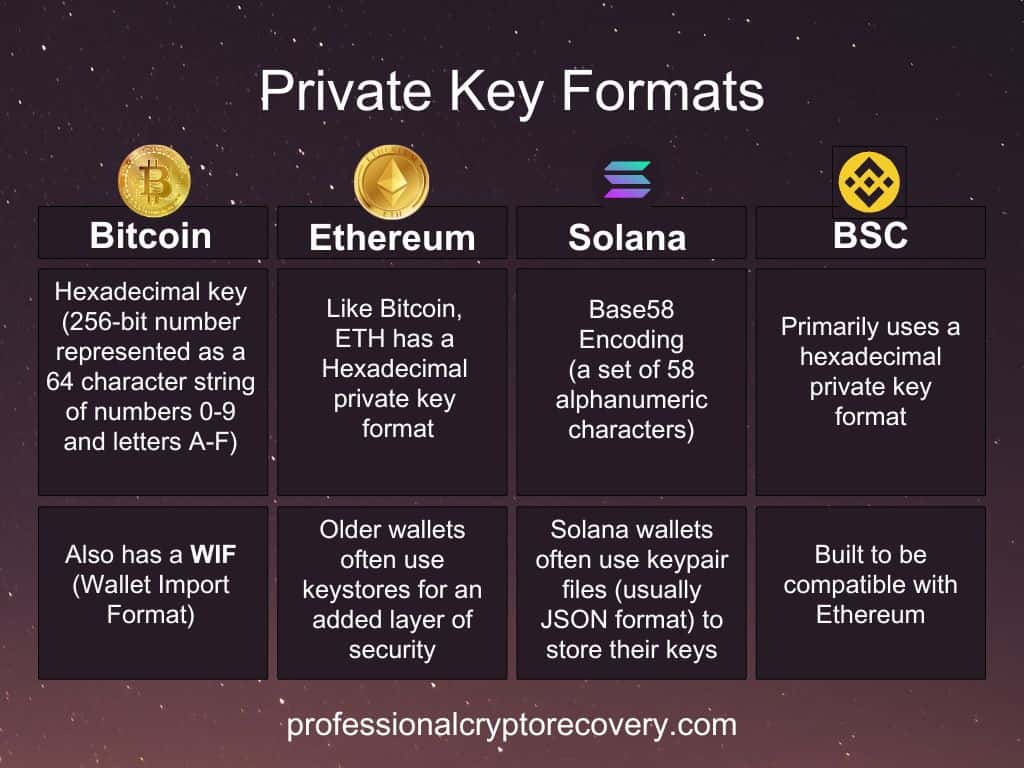
Here’s a look at the different private key formats categorized by blockchain.
Bitcoin
Bitcoin pioneered many of the private key formats still in use today. Considered the building block of Bitcoin private keys, the most basic of these is a raw hexadecimal key, a 256-bit number represented as a 64-character string of digits (0-9) and letters (A-F).
There is also WIF (Wallet Import Format), which bundles the raw key with a version prefix (to ensure it’s used on the correct network), a compression flag (to save space on the blockchain), and a checksum (to minimize input errors).
Note that every private key has a corresponding public key, which can be in compressed or uncompressed form. Compressed public keys are smaller than uncompressed ones (33 bytes compared to 65 bytes).
The private key format changes slightly depending on whether it is designed to generate a compressed or uncompressed public key. In this case, the WIF private representation has an extra byte to signal compression:
- When uncompressed: A 51-character base58 encoded string starting with ‘5’.
- When compressed: A 52-character base58 encoded string starting with ‘K’ or ‘L’.
Many modern Bitcoin wallets support hex and WIF. Bitcoin Core, the blockchain’s official client wallet, stores keys internally in WIF within its wallet.dat file.
Sometimes wallets aim to represent their private keys in a very compact form to make them suitable for embedding QR codes. The need has led to the mini private key format, which is usually around 30 characters long. It employs a built-in checksum to help detect typos.
Ethereum
Just as Bitcoin uses the hexadecimal format, Ethereum private keys use it as well. The typical Ethereum private key is a 256-bit number represented as a 64-character hexadecimal string.
Some popular wallets, like MyEtherWallet (MEW) and MyCrypto, use Keystores to add an extra layer of security. Keystores, often JSON files, bundle your encrypted private key with other metadata. To unlock them, you need the correct password. If you have lost or forgotten the password, keystore file recovery may be possible.
Keystores also help with portability, as you can move them between compatible wallets.
Solana
Solana wallets like Phantom and SolFlare use keypair files (usually in JSON format) to store their keys. These files contain both your private (32 bytes) and the derived public keys (32 bytes), making for a total of 64 bytes.
Solana’s keys are often represented in the Base58 encoding format, which uses a set of 58 alphanumeric characters. It purposefully removes easily confused characters, like 0 (zero) and O (capital o), and I (capital i) and l (lowercase L).
Using Base58 makes Solana keys easier to read and share by shortening their representation and avoiding confusion caused by similar-looking characters.
Uint8 is another common private key format on Solana. In this format, a 256-bit private key, as used in Bitcoin and Ethereum, is split into 32 chunks of 8 bits each. Each 8-bit chunk is represented as a Uint8 number. As a result, the entire private key becomes an array of 32 Uint8 values.
Since computers work very well with 8 bytes, Uint8 is more efficient and more precise than other formats.
Binance Smart Chain (BSC)
BNB largely uses the same 256-bit hexadecimal private key format as Ethereum. This is because the blockchain was built to be compatible with Ethereum, using what’s called the Ethereum Virtual Machine.
Private Key Issues and How to Deal With Them
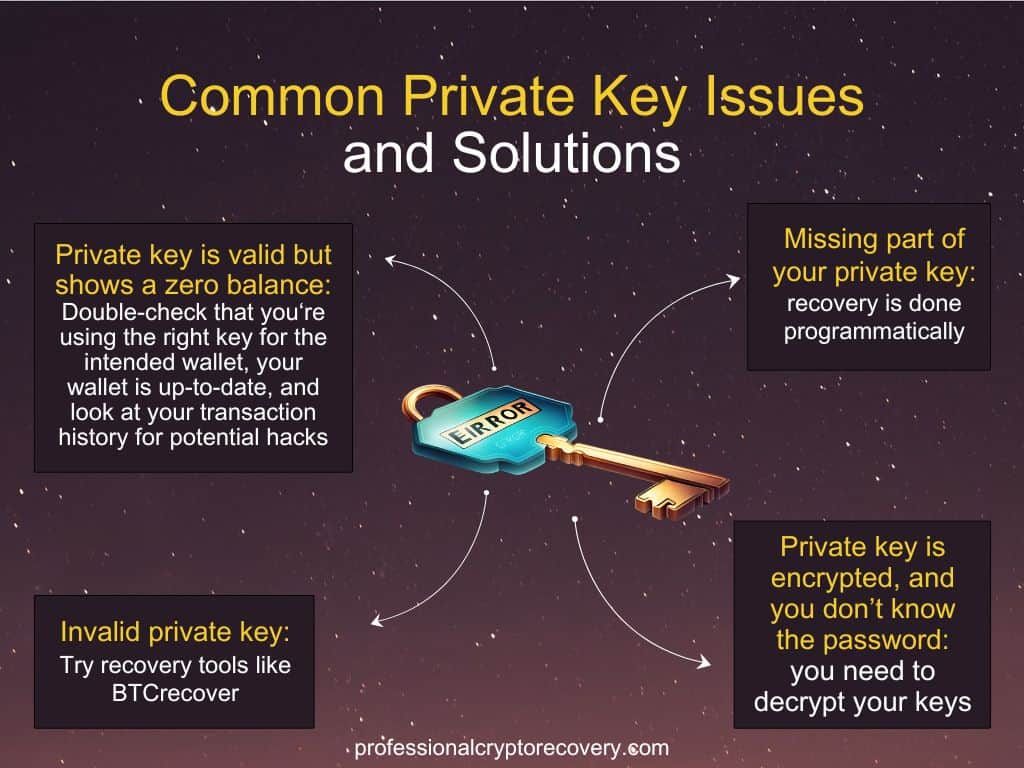
Unfortunately, private key problems are not uncommon. Here are some issues you might run into with your private keys and how to address them.
Invalid Private Key
The ‘invalid private key’ error typically occurs when the wrong private key is provided. This occurs when you get one or more characters wrong during input. If this is the case, you just need to input the key again, but this time, be more diligent about which keys you press.
But what if the error is in the source itself, i.e., it’s not a result of an input error; rather, the record itself of your private keys has been corrupted?
Well, you can use specialized tools to find and replace the invalid characters with the correct ones. BTCrecover is a popular tool that substitutes potentially incorrect characters with wildcards and automates the trial-and-error process.
Missing Part of Your Private Key
A private key that’s missing a fragment of itself is also considered invalid. The loss typically happens due to accidental file deletion or corruption caused by malware.
Dealing with this problem is not easy. You need to try every possible combination of the missing characters. Each missing character exponentially increases the number of possible combinations your wallet must try to unlock access.
You can try to guess the characters, but that is the equivalent of emptying an ocean with a spoon. It will take you forever to find the right answers. Recovery is usually done programmatically, allowing attempts with thousands of combinations per second.
You’ll need to pay attention to the private key format during recovery. Different private key formats have specific rules about which characters they can use.
Knowing which characters a private key format uses serves another purpose: it narrows down your search. Doing so eliminates pointless combinations when attempting brute-force recovery for a missing portion of the key.
Generally, the more incomplete your private key is, the harder you’ll have to work to find all the missing pieces. At some point, it becomes functionally impossible to recover a partial private key.
The Private Key is Valid but Shows a Zero Balance
If you have a complete private key and are certain that it’s the right one, but your wallet shows a zero balance when it shouldn’t, there could be a few different things going on.
For one, you might have generated the wrong public address format with your private key. Modern wallets allow you to generate multiple public addresses from the same private keys in different formats. Each format contains different assets. So, if you generate the wrong public address format, you will see a zero balance.
A zero balance may also occur if you mix your different addresses or keys. So, you’ll want to double and even triple-check that you’re using the right private key for the intended wallet and crypto assets.
It could also be that you’re using an outdated wallet version. Bugs or syncing issues in outdated versions can sometimes cause incorrect balance displays.
But if this or a mix-up isn’t the problem, it might be something else. Your account may have been hacked, and all your assets may have been transferred out. You’ll want to review your transaction history on the blockchain to verify your funds are still there.
If your wallet has been compromised and shows a zero balance, the attacker has already moved your assets. They likely obtained your private keys. In this case, nothing can be done to recover your funds.
Private Key is Encrypted, and You Don’t Know the Password
When using certain wallets, such as paper wallets, you’re advised to encrypt your private keys for security. For example, private keys for wallets created by bitaddress.org, liteaddress.org, and paper.dash.org can be BIP38-encrypted.
As with all encryption, it’s a problem if you forget the decryption password. You’ll be locked out and unable to use your private keys, even though they’re right in front of you.
To get out of this conundrum, you need to decrypt your private keys. You’ll need to crack your lost/forgotten password, something you can do with a tool like BTCRecover. However, this can be slow, especially if you have a strong password.
Let the Experts Handle It
Dealing with private key issues is stressful. Fortunately, you don’t have to figure out solutions on your own. If you lack the time or technical expertise to leverage wallet recovery tools to recover an invalid or partial private key, you can always solicit the services of a professional wallet recovery expert.
Professional Crypto Recovery (PCR) has been in the IT business for more than two decades. Having been part of the crypto space since its inception, we have the knowledge and experience needed to solve your private key problems. Contact us today to begin your private key recovery.