BRD Wallet, formerly known as Breadwallet, existed from 2014 until it was acquired by Coinbase in 2021.
It was the first decentralized crypto wallet available in the App Store, and at its peak had more than 10 million users and had more than $20 billion in crypto under its protection.
Sadly, those days are over, and BRD Wallet no longer exists in its original form. After its acquisition by Coinbase, there was a period where users could migrate their funds to the Coinbase Wallet.
However, if you had funds stored in the BRD Wallet, you should still be able to recover them and move them to another wallet. In this article, we’ll break down your options here and show you how to fix some common issues.
What Happened to Bread Wallet (BRD)?
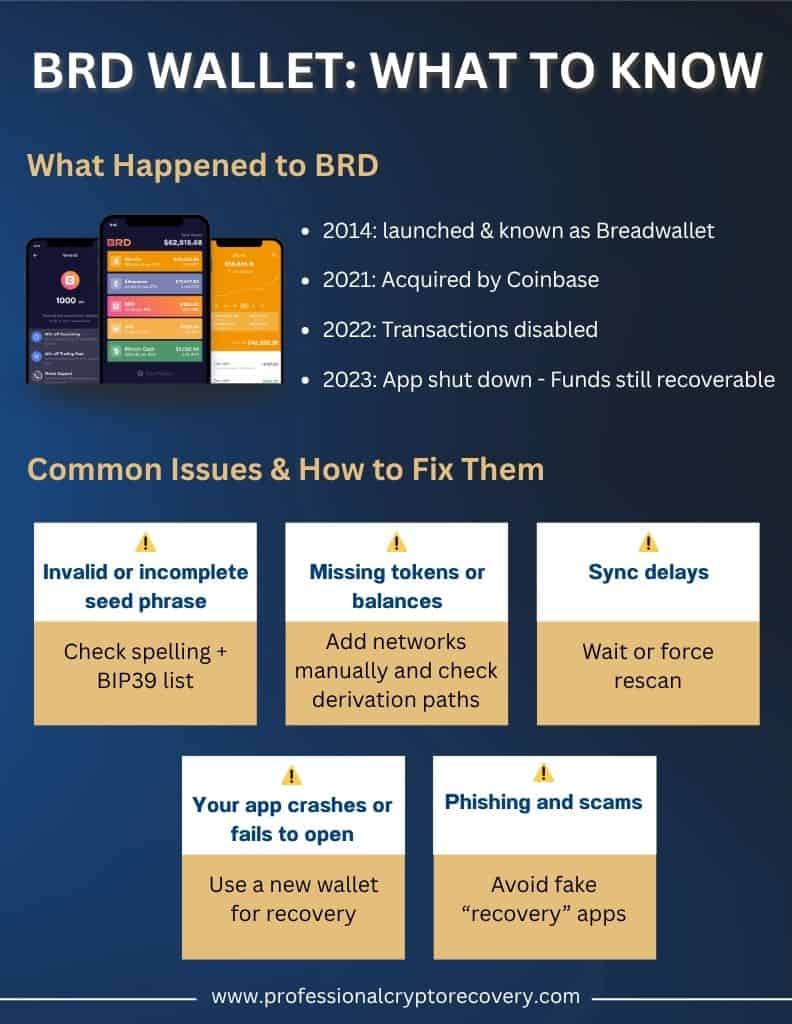
In 2021, after several years of operation, BRD Wallet was acquired by Coinbase. Shortly after, all BRD development came to an end, and users were told to migrate and move their funds elsewhere. By March 2022, the BRD app was no longer processing transactions, and by early 2023, it was fully shut down with no more updates or support.
BRD users were incentivized to migrate to Coinbase Wallet, but nobody’s crypto disappeared. If you have crypto stored on the BRD wallet, it’s still there. You just need your 12-word seed and optional passphrase to access it.
What Are Your Options for BRD Wallet Recovery?
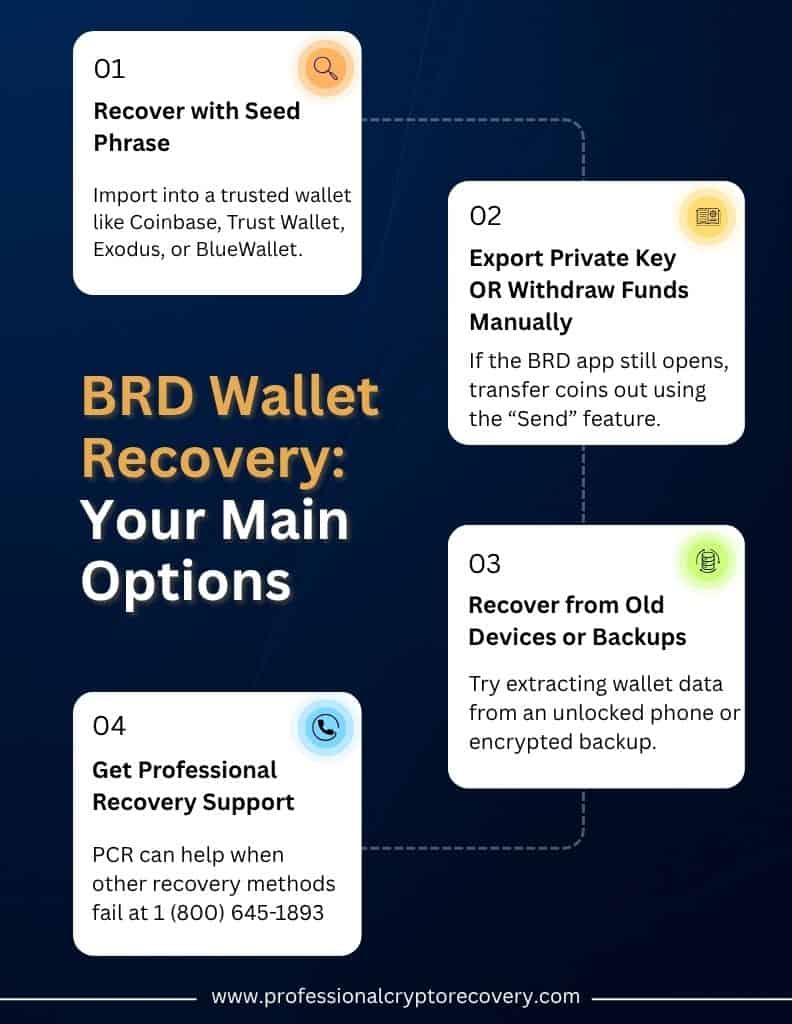
The good news here is that your BRD funds are recoverable. There are three main routes available to you here. Let’s check them out.
Recover With Your 12-Word Seed Phrase
The most secure and direct way to recover your BRD wallet is with your 12-word seed phrase. If you remember the phrase, simply import it into a compatible wallet like Coinbase or Trust Wallet.
Here’s how this process works with Coinbase. In the Coinbase Wallet app, tap “Restore Wallet”, choose “Secret Phrase,” and enter your 12 words. Coinbase will automatically detect the most popular assets like Ethereum and ERC-20 tokens, but you might need to add others manually by contract address.
Remember to only ever enter your recovery phrase into reputable, trusted wallets on a secure device.
If your assets don’t show up with this method, it’s most likely due to a derivation path issue. In this case, a professional recovery service like PCR may be able to help you access your funds.
BRD Wallet Recovery Options Without the Seed Phrase
If you don’t have your seed phrase, recovering your BRD funds is going to be extremely difficult. However, not all hope is necessarily lost. It may be possible to access your crypto via local backups or old devices that still have the wallet data on them.
If you’re still struggling, a professional recovery service might be able to help. At PCR, we can help you uncover your options and find out if it’s possible to recover your assets.
How Multi-Chain BRD Wallet Recovery Will Work?
BRD supported lots of different blockchains, including BTC, ETH, and BCH, and your 12-word seed phrase generated keys for all of these. In practice, this means your seed phrase will unlock all the addresses created by your wallet.
To regain access to your assets, you’ll use the same seed phrase but an appropriate wallet app for each. For example, BRD used the old BIP32 derivation path for Bitcoin addresses, so any wallet you use to import the BRD seed will have to use that path.
Common BRD Wallet Recovery Issues and How to Address Them
Unfortunately, recovering your funds from a BRD wallet won’t always go smoothly. Here are a few of the common challenges people tend to run into, and how you should deal with them.
Invalid or incomplete seed phrase
One common problem is mistyping your recovery phrase. If you don’t have exactly 12 words in the right order, all lowercase, with no misspellings or extra spaces, you’re doing it wrong. Some apps, like the Coinbase Wallet, will highlight incorrect words. If your import fails, try double-checking each word against a BIP39 wordlist.
Missing tokens or balances
After you import your seed, you might notice some tokens or coins are missing from your balance. Often, this is because some wallets don’t automatically list all coins. For example, for Bitcoin Cash or other altcoins, you may need to add that network to your wallet or use a wallet that’s specifically dedicated to that coin.
Sync delays
If your balances seem incomplete or wrong, you might need to give the app more time to sync with the network and rebuild transaction history. You can try restarting the app or forcing a blockchain rescan if that feature is available.
Your app crashes or fails to open
The BRD app is old and is no longer updated. This means it’s liable to crash or just show a “wallet disabled” screen. If this happens, you’ll need to focus on using your recovery phrase in a new wallet. Take what you need from the old device, and uninstall the BRD app once you’ve safely migrated your funds.
Phishing and scams
Some scammers will pose as wallets to try and trick you into sharing your seed phrase. Remember that reputable wallets like Coinbase will never ask for your seed or try to initiate a recovery on your behalf. If anyone contacts you asking for your recovery words or private keys, it’s a scam. Only ever use the official wallet app or site to recover your funds.
What Wallets Are Supported for BRD Migration?
Some wallets that support BIP39/44 seed phrases can restore your BRD wallet, while others will not let you enter custom derivation paths. The official recommendation here is to use Coinbase Wallet, a self-custody wallet that supports thousands of tokens, including Bitcoin, Litecoin, and Ethereum.
Coinbase isn’t the only option, though. Here are some other trusted wallets:
- Trust Wallet is a mobile wallet that supports a wide range of blockchains. It’s easy to import your BRD funds here by entering your 12-word phrase, and it’ll recover most chains.
- Exodus is a desktop and mobile multi-currency wallet. Just choose “Restore Wallet” and enter your recovery words.
- BlueWallet is a mobile Bitcoin wallet. It only works with BTC and BTC-derived coins, but it’s simple and user-friendly.
- MetaMask is a browser extension and mobile wallet for Ethereum, so it’s a good option to recover ETH and ERC-20 tokens.
Struggling With BRD Wallet Recovery? Let the Experts Help!
If you’ve tried all the above steps and still have no success recovering the assets from your BRD wallet, it might be time to reach out to an expert.
At Professional Crypto Recovery, it’s our job to help crypto users like you regain access to lost funds. We specialize in helping clients recover old and discontinued wallets, along with forgotten passwords, corrupted wallet files, and other complex cryptocurrency access issues. Our expert assistance is safe, confidential, and may help you recover your assets when nothing else has worked.t help you recover your assets if nothing else is working.
Get in touch with us to find out more about how we can help.
Frequently Asked Questions
Yes, your assets still exist on the blockchain and can be recovered. If you have your 12-word recovery phrase, this process can be fairly straightforward.
Yes, it’s possible to recover the funds in your BRD wallet without your recovery phrase, but it’s much more difficult. Your best option here is to try and access your crypto via backups or old devices.
You can recover your BRD funds to many different wallets. The recommended option here is the Coinbase wallet, since Coinbase acquired BRD.
Yes, you can use other wallets to recover your BRD funds. However, it’s extremely important to only use trusted wallet software from reliable sources.