Few cryptocurrency storage options provide as much security as hardware wallets. Designed to safeguard assets by keeping private keys offline, they are practically invulnerable to online hacking as long as you do your part to secure the seed phrase.
But this doesn’t make them invincible. They are, after all, physical devices vulnerable to wear and tear from age, misuse, and physical trauma. Consequently, it’s not uncommon for hardware wallets to break down.
So, what should you do if your hardware wallet stops working?
First, Take a Deep Breath
The immediate aftermath of breaking your hardware wallet can be frightening. But no matter how mangled the device is, things aren’t as bad as they look.
A hardware wallet only stores private keys. It is a tool for accessing and utilizing crypto assets, which exist entirely on the blockchain. So, breaking your hardware wallet will only cost you access to your crypto until you restore it.
How Hardware Wallets Break
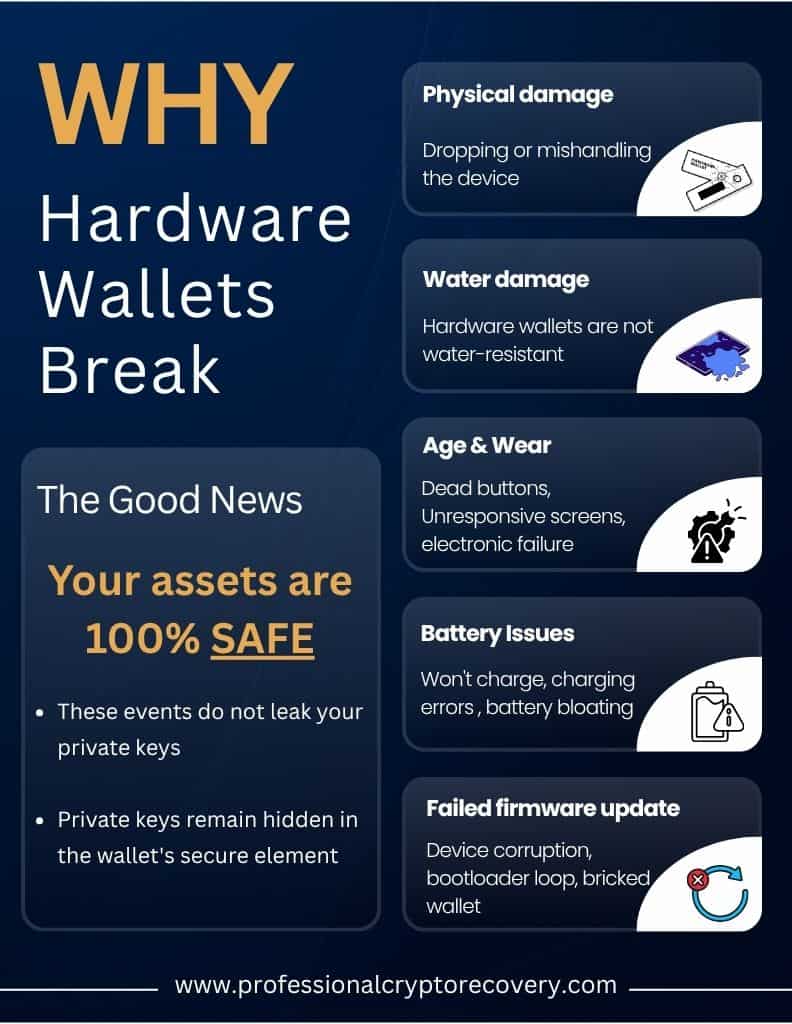
The most common ways that hardware wallets break are:
- Physical damage: Physical damage is the main culprit behind hardware wallets breaking down prematurely. It’s caused by physical trauma as a result of dropping or mishandling the device.
- Water damage: Other than a few rugged exceptions, like the Tangem wallet and ELLIPAL Titan, hardware wallets are not water-resistant. Drop one in water or any other liquid, and that’s the end of it.
- Age: Components wear with time and usage. This leads to dead buttons, unresponsive screens, and even complete electronic failure among units more than a few years old.
- Battery issues: Leaving your device uncharged for extended periods (e.g., 1–2 years) can cause the cell voltage to drop below a critical threshold. This can sometimes trigger an internal sleep state that prevents the battery from ever holding a charge again. Degraded connections between the motherboard prongs and the battery can also lead to charging errors. In extreme cases, a failed battery can cause bloating that warps the chassis or case.
- Failed firmware update: Firmware updates can go wrong due to device corruption or power interruption. This can format your wallet or even brick your device by trapping it in a permanent bootloader loop.
Whatever the cause, however, your assets are 100% safe. This is because none of these events leak your private keys. They are still safely hidden away in the wallet’s secure element. So as long as you have your seed phrase (and it hasn’t been compromised), you can always restore your crypto via another platform.
Your Seed Phrase Is the Key
Typical of non-custodial wallets, hardware wallets give users a 12 to 24-word phrase that is a mnemonic of their private keys. Some newer models even split the private keys’ seed across multiple mnemonics.
Either way, your actual private keys remain hidden in a secure chip. They can be used for authorizing and signing transactions while you keep the mnemonic safe.
This seed phrase is the ultimate key to your assets. As long as you have it, you can access your crypto on the blockchain via a supported hardware or software platform. This makes what would otherwise have been a devastating event, like breaking a wallet, tolerable.
What to Do if Your Hardware Wallet Is Broken
- Get a Replacement Device
If your hardware wallet is broken, you need to get a replacement device. Repair could be an option, but you’re generally advised to purchase a new device directly from the manufacturer to eliminate the risk of tampering.
Consider which device you want. Do you want the same model, or upgrade to a different model? An important factor to consider while selecting models is seed compatibility.
BIP-39 is the generally accepted standard for generating a 12- or 24-word recovery phrase. You can usually replace a model from one manufacturer with a model from a different manufacturer as long as you remember to use the correct derivation path.
BIP-39 isn’t the only standard, however. There is also SLIP-39, better known as Shamir Backup, developed by Trezor.
SLIP-39 is a relatively new standard that splits your recovery seed into multiple unique 20-word phrases (shares) to eliminate single points of failure. If your mnemonic phrase was generated using SLIP-39, your replacement options will be limited.
Keep in mind that you can always use the seed phrase to access your accounts in a software wallet. Most, if not all, software wallets adhere to the BIP-39 standard, so you’re spoiled for choice.
- Restore Your Accounts on the New Device
Once you’ve obtained your replacement platform, it’s time to restore your accounts. This is a relatively simple process:
- Open your wallet software.
- You’ll be presented with two options: create a new wallet or restore an existing one.
- Pick the latter option and input your recovery phrase as requested.
- If you’ve provided the correct phrase, you should be able to access all your accounts and go back to freely transacting.
If you created a hidden wallet using a passphrase, you need to provide the correct seed phrase plus the passphrase.
Situations That Complicate Recovery
Recovering a broken hardware wallet is a relatively straightforward process. Select a replacement, hardware or software, and use your seed phrase to restore your accounts.
However, not all cases play out this way.
Recovery can be derailed if:
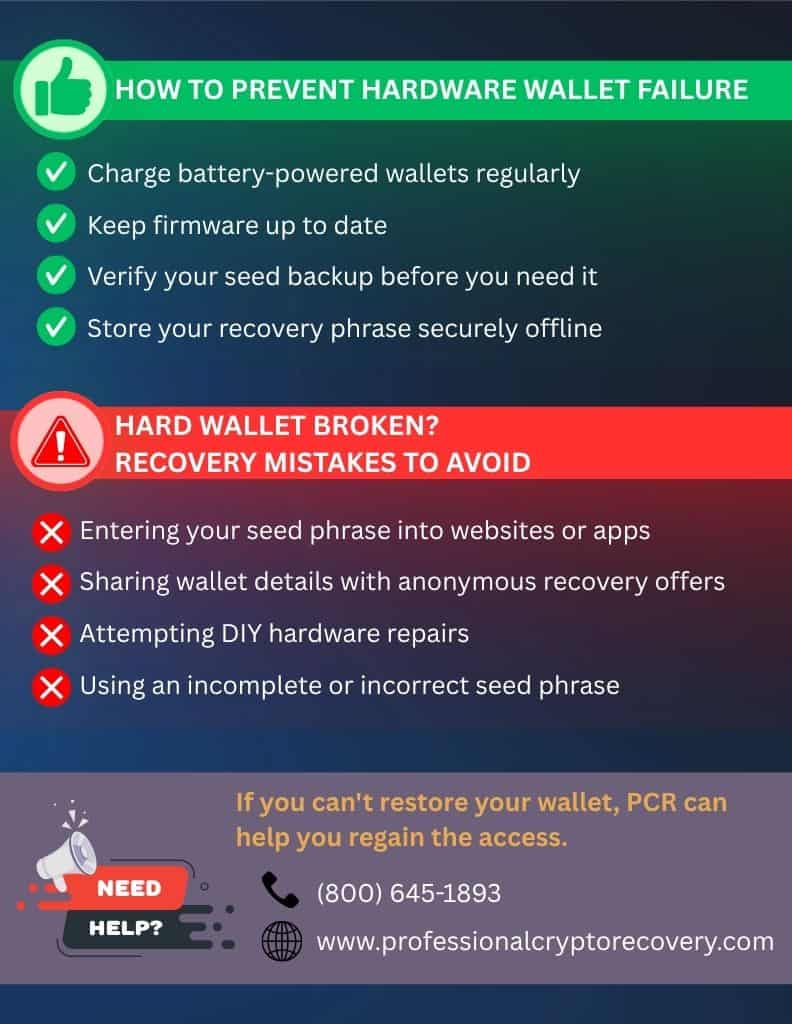
You’ve Entered Your Mnemonic Into Any Website or App
Scammers and hackers have built an industry around stealing private keys and mnemonic phrases, which they use to fraudulently access victims’ money. In 2025, authorities received 181,565 complaints totaling more than $11 billion in losses in America alone.
The risk is ever-present, especially after your wallet breaks. You’ll be acting out of extreme urgency, and if there’s one art scammers have mastered, it is weaponizing this panic to get your money.
The Internet Crimes Complaints Center (IC3) tracked more than 10,500 recovery scam complaints in 2025. These were attributed to fake legal firms, website clones, fictitious blockchain experts, and individuals pretending to be IC3 employees. All these scams leveraged the victim’s despair to drain an estimated $1.4 billion.
So, if your hardware wallet is broken, do not share any crucial information online or with anonymous figures offering recovery on Internet forums and boards. Otherwise, you could lose all the funds associated with accounts in your hardware wallet.
You Attempt to Repair Your Wallet Yourself
Manufacturers design hardware wallets to be tamper-resistant. Only a professional should attempt to open a device. If your hardware wallet is broken, do not try opening the device or repairing it yourself.
You Don’t Have the Correct Seed Phrase
Ultimately, your seed phrase is what determines whether or not you can access your assets after breaking a hardware wallet. If you don’t have the complete seed phrase, you’ll have to find another way to recover your crypto.
This often means leaving it to the experts.
How Professional Crypto Recovery Helps With Hardware Wallet Recovery
If your hardware wallet is broken, and for one reason or another you can’t restore it on a different platform, Professional Crypto Recovery (PCR) is here to help.
PCR is a crypto recovery service that specializes in regaining access to lost crypto. Our services range from PIN and password recovery to mnemonic phrase reconstruction across all hardware wallet models.
If you’re having trouble recovering your wallet due to a lost seed phrase, contact us today. A crypto recovery expert with over 2 decades of experience in IT and data recovery will work closely with you to get back your assets.
Our hardware wallet recovery services are some of the most affordable online. We don’t take payment up front. The service operates on a strict no recovery, no payment basis.
How to Protect Your Hardware Device From Failing
Some things, like age-induced failure, you can’t do much to prevent. But there are measures you can take to prevent your Ledger, Trezor, or other brand of hardware wallet from failing prematurely.
Keep the Battery Alive to Avoid Deep Discharge
If your hardware wallet has an internal lithium-ion battery, like the Ledger Nano X, Ledger Flex, Trezor Safe 7, and many other models, it cannot stay locked away for long periods without being plugged in.
So, if you have no intention of using your assets, you should still set a recurring reminder to plug in and charge your device every month. This is the only way to prevent catastrophic voltage drops.
Do Not Skip Firmware Updates
Skipping major software updates is a huge risk. This is because when you do come around to updating, forcing the device to jump through five or six major firmware versions all at once can brick the internal bootloader due to structural leaps in the cryptographic code.
You want to plug your wallet into its official desktop suite (Ledger Live for Ledger wallets, or Trezor Suite for Trezor) at least once a year. This ensures you can keep your wallet for its rated lifespan.
Confirm Your Seed Backup
You receive your seed phrase the moment you create your wallet. You’re supposed to record it and secure it until you need it. Nonetheless, do not assume your written seed phrase is correct. A single transposed letter or sloppy handwriting can lock you out, and it’ll be too late to fix it.
Instead, you want to use your wallet’s native, safe verification tools to check your backup while the device is still functional. You’ll be prompted to enter your backup words so the wallet software can verify the words match the keys inside its secure chip.
If you have the correct backup, you can store it with confidence. Make sure to record the correct version and double-check it.
You can now go back to using your crypto or HODLing it for later.
Dedicated Broken Hardware Wallet Recovery Services
Professional Crypto Recovery (PCR) has been in the recovery business for many years. Backed by 20+years of experience in IT and data recovery, we possess the skills, tools, and experience needed to recover your broken hardware wallet.
Our services are efficient and affordable. We also maintain consistent communication and transparency with the client at all times. Contact our wallet recovery specialist by filling out this form. Alternatively, you can reach us by phone at (800) 645-1893.
Frequently Asked Questions (FAQs)
No. Your assets live on the blockchain. If your hardware wallet stops working, the assets are still onchain. You just can’t access them until you use a different platform.
If your previous wallet used the BIP-39 standard to generate its seed phrase, you can use any brand of hardware wallet. Makes sure to use the correct derivation path or you’ll end up with different addresses.
If it uses SLIP-39, you’ll need a compatible hardware wallet (such as Trezor) to restore your accounts.
No. You could further damage your wallet, which will only complicate recovery. If your hardware wallet is broken, leave it to the experts to restore it.
You’ll know by the number of words in your mnemonic phrase. Unlike BIP-39, which results in a seed phrase 12 or 24 words long, SLIP-39 generates 20-word phrases known as shares.
t depends on the state of your device. But generally, you’ll need to discuss with a wallet recovery professional to know if recovery is possible.
Contact us today to book a free consultation session with a recovery expert.