Crypto wallet recovery can take anywhere from a few hours to several weeks, and every now and then it takes months. Sometimes wallets are not recoverable. Nobody can honestly give you a fixed number before they’ve looked at your case. What they can tell you is what the timeline depends on, and how likely it is that they can recover your wallet.
Here’s what to expect for each common situation, what makes some recoveries quick and others slow, and what you can do right now to shorten the wait. This is about getting back into a wallet you own. It isn’t about chasing stolen funds, which no recovery service can bring back.
How Long Does Crypto Recovery Take for Different Scenarios?
The coin and the amount usually have very little to do with how long recovery takes. What changes the crypto recovery timeline is the kind of problem you have and how much you can tell us about it.
Here’s a rough guide. These are ranges, not promises, and every case still needs its own assessment.
| Scenario | Typical timeline | What drives it |
|---|---|---|
| Forgotten wallet password | Hours to months, or may not be recoverable | How much of the password you remember |
| Forgotten BIP39 passphrase | Hours to months, or may not be recoverable | Your passphrase clues, plus having the full seed |
| Seed words out of order, misspelled, or hard to read | Hours to a few days | How many words are uncertain |
| One or two missing seed words | Usually hours | Whether you know where the missing words go |
| Three missing seed words | Hours to days | Known positions and a known address |
| Four missing seed words | Weeks to months, or may not be recoverable | Computing power and known positions |
| Five or more missing seed words | Usually not recoverable | Too many combinations to search |
| Corrupted, deleted, or damaged wallet files | Days to weeks, or may not be recoverable | How much of the data has survived |
| Old or discontinued wallets | Days to weeks | Ability to get wallet files and if you know your password |
| Damaged or locked hardware wallet with no seed | Weeks, and often not recoverable | The model and firmware version |
| Sweeper bot on a compromised wallet | Depends on when the remaining assets can move | Getting there before the bot does |
Forgotten Wallet Password
You’ve got the wallet file, whether that’s a wallet.dat, a keystore file, or a browser wallet’s vault, but the password won’t open it. If you remember the words you tend to use or an older password it was based on, recovery can take hours. With very few clues it can take weeks to months, and sometimes it doesn’t work at all.
Start a list now of every variation you might have used, including typos and capitalization habits. Our guide to recovering a wallet password or passphrase goes into more detail, and our forgotten password recovery service is there if you’d rather get professional help.
Forgotten BIP39 Passphrase (25th Word)
Your seed phrase is usually 12 or 24 words the wallet showed you at setup. Some people also added an optional passphrase on top of it, often called the 25th word (or the 13th on a 12-word seed). It isn’t stored anywhere, and each different passphrase opens a completely different wallet.
If you have the full seed phrase, a forgotten passphrase works a lot like a forgotten password. Good clues can mean a fast result, and no clues can mean a long search or no result at all.
If you restored your seed and the wallet shows a zero balance, don’t assume the money is gone. A wrong or missing passphrase opens a valid wallet that happens to be empty.
Seed Words Out of Order, Misspelled, or Illegible
When all the words are there but some are in the wrong order, misspelled, or hard to read, recovery is often quick. That’s usually hours, sometimes a day or two, and a few readable letters in a smudged word narrow it further. The exception is a 24-word recovery phrase with a completely unknown word order. The number of possible combinations is so large that recovery is not feasible.
Don’t settle on a single guess for a word you can’t read. Write down every word you think it could be and share all of them. If your wallet says the phrase is invalid, our post on how to fix an invalid seed phrase explains the usual causes.
Seed Phrases With Missing Words
How long this takes depends on how many words are gone. One or two missing words usually take hours. Three can take hours to days, and four need a lot of GPU power and can take weeks to months. Five or more usually means recovery isn’t possible.
Knowing which positions are missing, say the 4th and the 9th, shortens the search a lot. Our guide on how to recover a lost seed phrase covers what to check first, and our seed phrase recovery service handles cases like this.
Corrupted, Deleted, or Damaged Wallet Files
This includes wallet files that won’t load, damaged keystore files, wallets that were deleted, and drives that failed or got wiped. These cases usually take longer than a plain forgotten password because the data has to be recovered before anyone can work on unlocking it. That’s often days to weeks. Sometimes the data is too far gone to get back.
Stop using the affected drive right away. Every new file written to it can overwrite what’s left of the wallet. Our crypto data recovery service works on wallet files, drives, and devices in this state.
Old or Discontinued Wallets
Older wallets like MultiBit, Toast, Blocktrail (BTC.com), and early Blockchain.com wallets can present unique recovery challenges, but they don’t necessarily take longer to recover. Some can be recovered relatively quickly, while others require additional work due to outdated software, unusual file formats, or limited documentation. Recovery can also take longer if you’re unsure which wallet you originally used.
If possible, try to determine approximately when you created the wallet and what device you used. These details can help identify the wallet and the best recovery approach. Our page on old and discontinued wallet recovery covers many of the legacy wallets we work with.
Damaged or Locked Hardware Wallet Without a Seed Phrase
This section only applies when there’s no usable seed phrase. If you forgot your PIN but still have the seed, you can reset the device and restore it from the seed, and that’s usually the end of the problem.
Without a usable seed phrase, recovery options are much more limited and depend on the hardware wallet’s model, firmware version, and the nature of the problem. Recovery may be possible in some cases, but it’s not guaranteed, and certain situations can require more time and specialized work. If you still have your seed phrase, our post on what happens when a hardware wallet breaks explains how to restore your wallet.
Sweeper Bots and Compromised Wallets
A sweeper bot is a script that someone sets up after getting hold of your private key or seed phrase. It watches the wallet and moves out any funds the moment they arrive. This also includes any ETH sent to cover gas fees, preventing you from transferring remaining tokens or performing DeFi transactions like unstaking.
Here the timeline isn’t about searching for a password. It’s about getting whatever’s left out before the bot takes it, often timed for when staked or locked tokens become available. Anything the bot already moved has been stolen, and no recovery service can get that back.
Don’t send any more funds to the compromised wallet. Our guide to Ethereum sweeper bots explains how the rescue works.
What Factors Affect How Long Crypto Recovery Takes?
Most wallet recovery is a search. The work means testing possible passwords or seed words until the right one unlocks the wallet. Anything that makes that search smaller or each guess faster shortens the timeline, and anything that does the opposite stretches it out.
How Much of Your Password You Remember
A forgotten non-custodial wallet password can’t be reset. There’s no company holding a copy, so the only way back in is to test candidates at scale until one works.
Clues change that a lot. Likely words, number patterns, old passwords, and typing habits all let the search skip billions of combinations that don’t fit. Remembering “my dog’s name plus a year” puts you in a much better spot than starting from nothing.
How Many Seed Words Are Missing
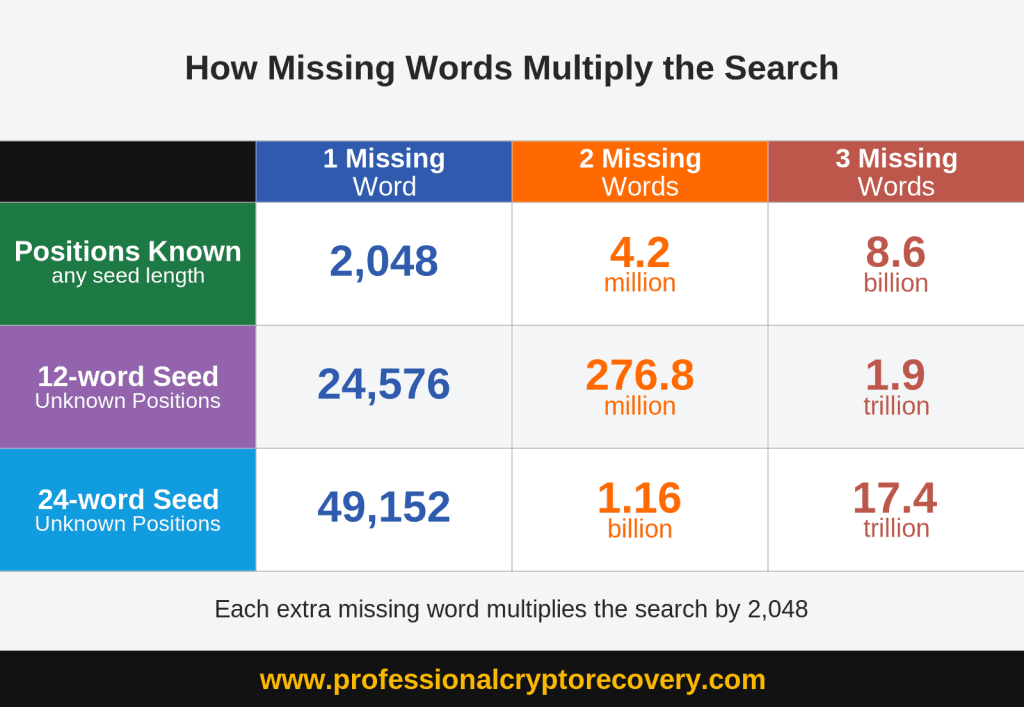
Most seed phrases are built from a fixed list of 2,048 words, the BIP39 word list. Each missing word in a known location multiplies the search by 2,048:
- One missing word means 2,048 candidates.
- Two missing words means 4,194,304.
- Three missing words means 8,589,934,592.
The phrase carries a checksum, a built-in check that the words belong together, and it rules out most of those candidates quickly. The rest still have to be tested against the wallet’s addresses. Those numbers assume you know where the missing words go. If you don’t, every possible position has to be tried as well, and the search gets much larger.
Wallet Encryption Strength and Computing Power
Some wallets are built to make every password guess slow on purpose. It’s a security feature, and it means the same number of guesses can take minutes on one wallet and weeks on another.
Hardware is the other half of it. Graphics cards (GPUs) run far more guesses per second than an ordinary computer, and several working together cut the time further. That’s why a search that’s hopeless on a laptop can be realistic for a recovery service.
Wallet Type and Age
Common, well-documented wallets are faster to work with because their file formats and recovery tools are well known. Older or discontinued wallets can need extra work before the search even starts, like identifying the exact format or getting outdated software to run.
Condition of Wallet Files, Drives, or Devices
A healthy wallet file means work on the password can start right away. A failed drive, a wiped device, or a partly corrupted wallet.dat or keystore file adds a step first, because the data has to be recovered before it can be unlocked. Our complete guide to wallet.dat security and recovery covers the Bitcoin Core side in more depth.
How Quickly You Respond and Share Details
A lot of recoveries stall while waiting on the owner for a file, another round of password guesses, or a detail about the wallet. Sending complete information up front and answering follow-up questions quickly can take days off the process. Make sure you only send data through the secure methods provided by the recovery service.
When Recovery Isn’t Possible on Any Timeline
Some cases can’t be solved no matter how long anyone works on them. If there’s no seed phrase, no wallet file, and no password clues, there’s usually nothing to search from. A wallet address on its own won’t get you in, because it shows the balance but doesn’t give anyone access to it.
Five or more missing seed words usually fall into the same category. The number of combinations gets too large to search in any practical amount of time, even with powerful hardware.
It’s a hard thing to hear when real money is involved, but it’s better to know early than to pay someone who promises otherwise.
How to Speed Up Your Crypto Wallet Recovery
What you do before contacting a recovery service often matters as much as the recovery itself. Good preparation shortens the search, and a few common mistakes can turn a recoverable wallet into one that can’t be saved.
Stop Making Random Unlock Attempts
Guessing over and over rarely works, and it can do real damage. A Ledger wipes itself after three wrong PINs and a Trezor wipes after 16. If you don’t have the seed phrase and your hardware wallet resets, recovery becomes impossible. Some wallet apps also lock you out or slow down after a run of failed attempts.
If you do try, keep a log of everything you enter. A list of what’s already been ruled out is useful information for a recovery service.
Don’t Reinstall the Wallet or Write to the Drive
Reinstalling the wallet app, updating it, or saving new files to the same drive can overwrite the data your recovery depends on. Stop using the affected device or drive until a professional has looked at it.
Find and Back Up Your Wallet Files First
Wallet files are often the most important piece of a recovery. That might be a wallet.dat, a keystore JSON file, or the vault a browser wallet keeps inside your browser profile.
Shut down the app and then copy the files to a separate drive before you try anything else, so a mistake can’t destroy the only copy. Desktop wallets usually keep their files in the app’s data folder, and keystore files can sometimes end up in Downloads. If the file was deleted, skip this step and leave the drive alone.
Write Down Every Password Variation You Remember
List every password you might have used, even the ones you’re sure are wrong. Add fragments, favorite words, number patterns, and habits like swapping letters for symbols or adding a year at the end.
Even a partial or uncertain clue helps narrow the search. Write it all down now, while it’s still fresh.
Note When and How You Created the Wallet
The date you created the wallet, the device you used, and the wallet software all point to the file format and encryption type. That saves time right at the start.
Old emails, exchange withdrawal records, and purchase receipts can jog your memory and help with the recovery. So can the earliest transactions on a block explorer. Write down all the wallet addresses you know, because they let the search confirm a match.
Gather Old Devices and Any Backups
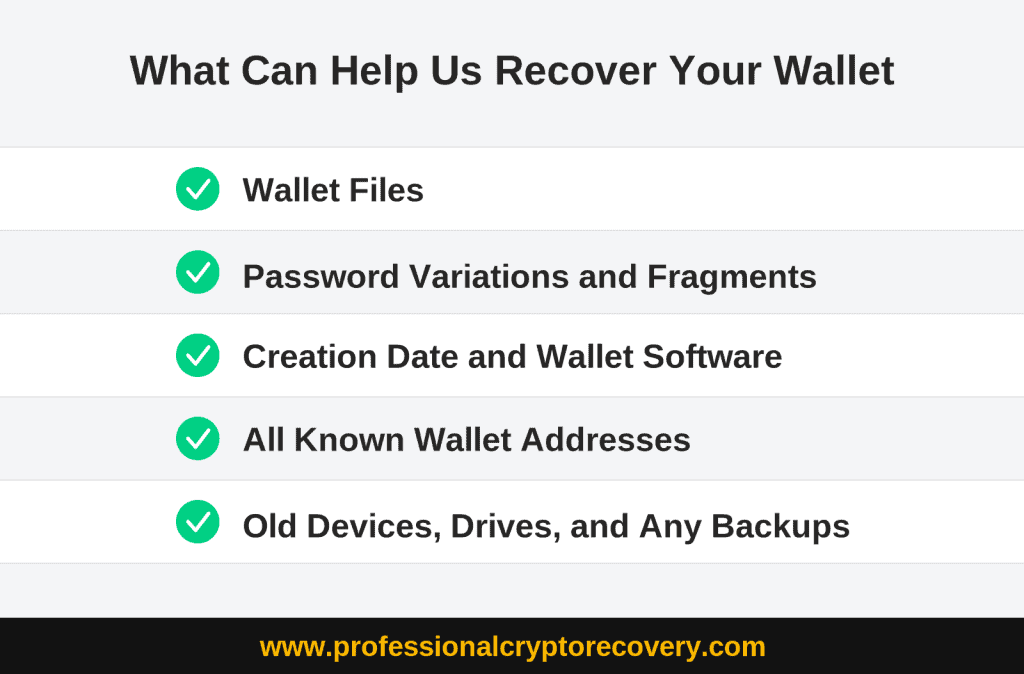
Before you reach out, collect old laptops, phones, USB drives, external drives, printed notes, and notebooks. List the cloud storage accounts you used back then too. Wallet files and seed phrases often turn up somewhere the owner had forgotten about. Just collect them for now, without opening or changing anything. Keep in mind that seed phrases and private keys should not be stored on a computer unencrypted.
Recovery Red Flags That Should Make You Walk Away
Fake recovery services are everywhere, and the timeline they promise is one of the easiest ways to spot them. A legitimate service gives you an honest range and admits it’s uncertain, while scammers promise speed and certainty. Our guide on choosing the right crypto recovery service goes deeper on this.
Guaranteed Recovery Promises
No legitimate service can guarantee recovery, because some cases simply can’t be solved. A fixed fast turnaround like “recovered in 24 to 72 hours” is a common pattern on scam pages.
A real service assesses your case first. Then it gives you a realistic range and tells you honestly what the odds look like, even when they’re poor.
Upfront Payment
Scammers often ask for a processing fee, software costs, gas fees, or taxes before you receive your lost assets. Be wary of any service that wants any money out of your pocket. Legitimate services work on a success-fee basis, so you only pay if they actually recover something and they take the fee out of the recovered assets.
Requests for Your Seed Phrase or Private Key
If anyone asks for your seed phrase or private key over chat, email, social media, or phone, treat it as a red flag. That information gives whoever holds it full control of your funds. A legitimate service doesn’t need it to start a conversation, and PCR won’t ask for one. The same goes for anyone who wants remote access to your computer.
When a case does involve sensitive material like a partial seed phrase, a legitimate service only handles it after an assessment and a signed contract. The recovered funds should then go straight to a new wallet you control.
Unsolicited Messages Offering Recovery Services
Scammers watch Reddit, X, Telegram, and crypto forums for people describing lost or stolen crypto. Then they reach out pretending to be recovery experts, exchange staff, or even law enforcement.
Legitimate services don’t cold-message people. Find and contact a service yourself, check its reviews on independent platforms, and ignore anyone who contacts you first.
Get a Realistic Recovery Timeline From PCR
How long your recovery takes depends on your specific situation, so the first step is an assessment of what you still have. That’s where PCR starts. We look at the files, clues, and devices you have and then give you a realistic range instead of a promise. An assessment will look at how feasible a successful recovery is, not a guarantee that we can get you back in.
You can read how our recovery process works before you get in touch. Our pricing is success-based: 18% of what’s recovered, taken from the recovered assets, with no upfront cost. If we can’t recover anything, you don’t owe us anything.
To book a free consultation, fill out our get-started form or call 1 (800) 645-1893.
Frequently Asked Questions
No. Once a transaction confirms on the blockchain it can’t be reversed, and no recovery service can pull the coins back from the address they were sent to. That includes PCR. If your funds were stolen, report it to the FBI’s Internet Crime Complaint Center and treat it as a law-enforcement matter.
We usually respond within 24 hours, and you can call 1 (800) 645-1893 to reach someone right away. The first conversation is about understanding your situation. Any timeline we give comes after that.
Yes. A search that runs for weeks shouldn’t mean weeks of silence. We keep you posted as the work moves along and tell you plainly if the odds change.