It’s estimated that as much as 4 million Bitcoin have been lost forever. A lot of that isn’t stolen. It’s sitting on the blockchain behind a wallet nobody can open.
There’s no support line to call and no password reset email to request. That’s the part that catches people off guard. The wallet app, the laptop, or the hardware device never held the coins. Those tools hold the keys that prove the coins belong to you.
So what does “I lost my wallet” actually mean? And what can you still do about it? Here’s how to tell.
How Crypto Wallets Work
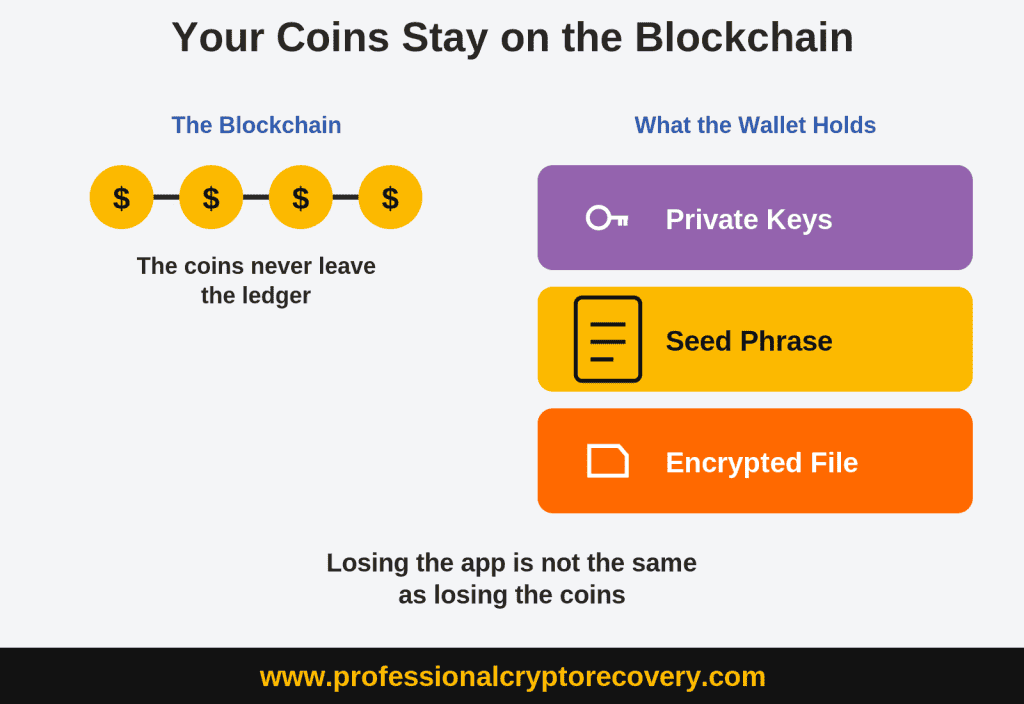
A wallet isn’t a vault. It holds the keys, and the Bitcoin or Ethereum sits on the blockchain. What the wallet actually stores is a seed phrase, private keys, or an encrypted backup that lets you prove those coins are yours.
That’s why losing the app isn’t the same as losing access to the funds. If you delete your MetaMask wallet from your phone or smash a Ledger device, your correct seed phrase can usually rebuild the same wallet somewhere else. If you lose every remaining copy of those keys or your seed phrase, then there’s nobody who can reset access for you. That’s the cost of holding the keys yourself. Our guide to how cryptocurrency is actually stored covers the public key, private key, and seed relationship in more depth.
Not every “wallet” works this way. If you use a custodial wallet on an exchange then you don’t store the keys, they do. Smart wallets and some multisig setups use passkeys, recovery contacts, or multiple signers instead of a single phrase. Normally a standard seed import won’t restore your wallet in those situations.
Protecting Leftover Data
Write down everything you still have on paper and set aside any electronics that you used. The small details are often more useful than they seem.
- Wallet name and version, the device or browser you used, and roughly when you set it up
- Any seed words you still have, even if they’re incomplete, out of order, or hard to read
- Password clues: length, patterns, substitutions, names, dates
- The email address you were using when you acquired the crypto
- Old receiving addresses, transaction IDs, or explorer links
- Backup files, USB drives, old laptops, printed paper, metal plates
Keep those notes on paper. Don’t put seed words in a cloud note, an email, or a text file. And don’t photograph them. Phone cameras sync to iCloud or Google Photos by default. That applies to damaged backups too. If a paper slip is fading or a metal plate is hard to read, transcribe what you can make out by hand and leave the original alone.
Never enter your seed phrase into a website, a support form, or a message to anyone. That includes so-called online recovery tools, wallet support chats, and strangers offering to walk you through a restore. Anyone who gets the phrase can empty the wallet. They won’t need your password or your device to do it.
Common Wallet Situations
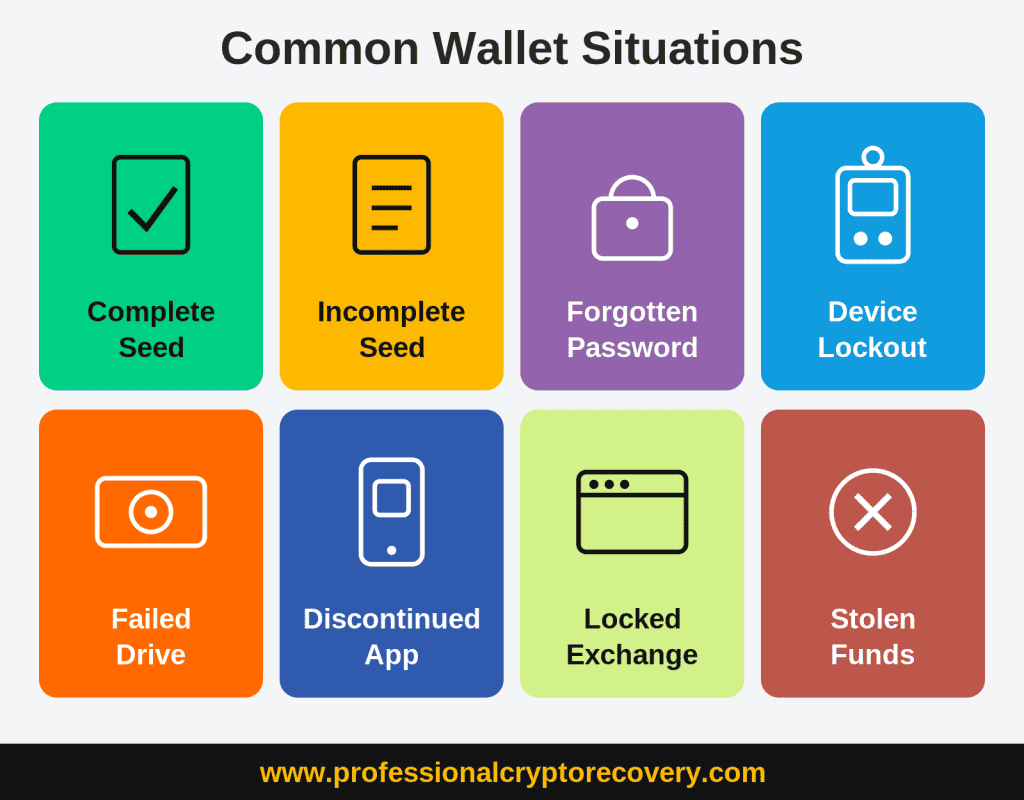
- A complete seed phrase. Often takes just a few minutes of work on your own.
- An incomplete or rejected phrase. Often worth reconstructing, especially if most words are known.
- A forgotten password, wallet file intact. May be recoverable if you remember part of it. PCR can sometimes recover your wallet even if you don’t remember any of your password.
- A lost, broken, or PIN-locked device. A correct seed phrase usually restores the same wallet to new hardware.
- A deleted file or failed drive. Recovery may be possible. Power off your device right away.
- A discontinued app. Keys may still live in an old backup or leftover wallet data.
- A locked exchange account. Has to go through the exchange. No service can bypass it.
- Stolen or already-sent funds. No recovery service can get these back. Report it to the proper authorities.
Each one has its own section below. If you’re not sure which fits, leave the original materials alone and start with the closest match.
A Complete Seed Phrase
This is the scenario you want. If the seed phrase is complete and spelled correctly in the original order, you can often restore your wallet.
Download the wallet from the official site or app store listing. Lookalike apps are a common way people get scammed. Choose Import or Restore, then enter the words exactly as written in order and in lowercase.
If the app asks you to set a password, that’s only a lock for this install. You generally don’t need the old app password or PIN. A passphrase is not the same thing. If you added one when you created the wallet, you still have to enter it on restore. People call that extra secret the 25th word. It has to match exactly, including spacing and capitalization. If you leave it out, the seed will open a perfectly valid wallet that isn’t the one holding your funds.
If you’re moving to new hardware, you’re often not locked to the original brand. A BIP39 seed can usually be restored on any compatible device that supports your phrase length, derivation paths, and the coins you hold. If you set a passphrase, it has to support that too. Buy it directly from the manufacturer and verify that it creates the same wallet addresses you previously used.
Count Your Words First
Not every backup is BIP39, and this trips people up more than anything else on this page.
A 20-word backup isn’t a BIP39 seed. It’s SLIP39. Trezor calls it a Single-share Backup and used to call it Shamir. It’s been the default on the Trezor Safe 3 since June 2024 and on the Safe 5 and Safe 7 since launch. SLIP39 uses a different wordlist. Typing those 20 words into MetaMask or a Ledger doesn’t just fail. It can be rejected as invalid even though the backup is perfectly good.
If you need to restore a 20-word SLIP39 backup, the reliable option is using a Trezor. A few other wallets can import it, including Rabby, Electrum, Sparrow, and BlueWallet. Most still can’t, including MetaMask and Ledger. The two standards don’t convert into each other either.
Trezor still supports BIP39 in full. Plenty of Trezor users do have a normal 12- or 24-word phrase. Count the words before you assume which one you’re holding.
Older Electrum seeds are the other common exception. Some aren’t BIP39 either. A generic Ledger or Trezor restore may open a valid but empty wallet. Match the original software first. PCR handles Electrum recovery when that path isn’t obvious.
A Zero Balance After Restore
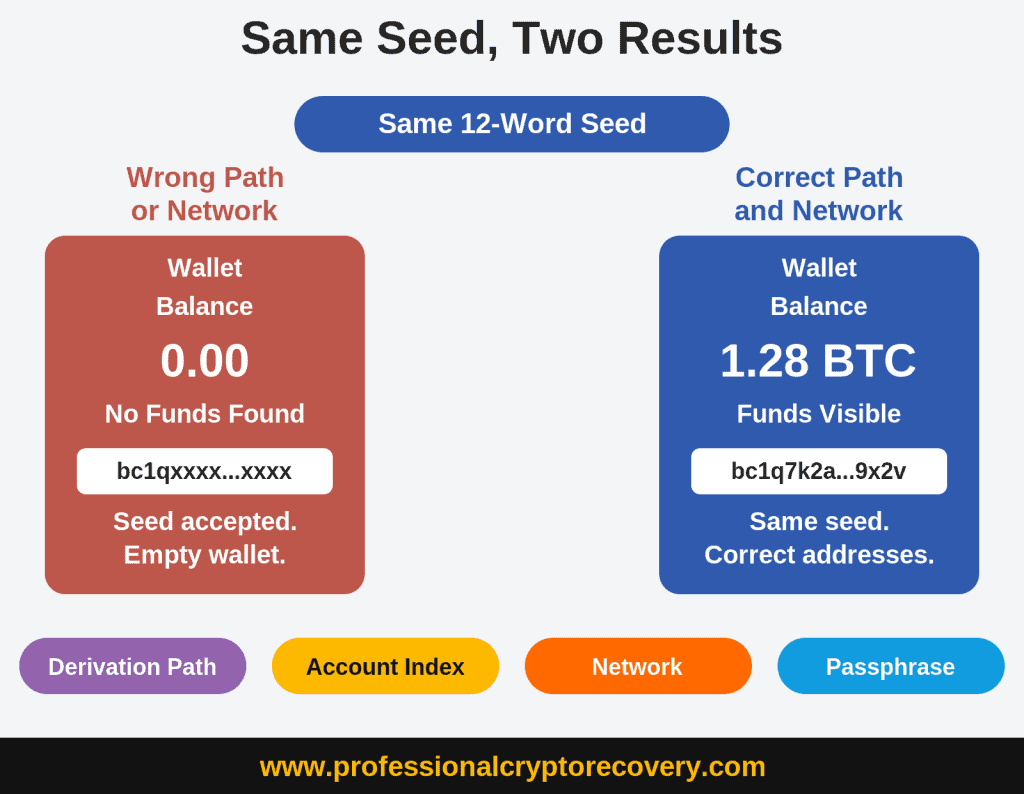
A zero balance doesn’t always mean the funds are gone. It usually means the wallet is looking at the wrong addresses.
- Derivation paths. Bitcoin wallets may use Legacy, SegWit, Native SegWit, or Taproot paths. Restore into the wrong address type and you’ll see a different, empty account.
- Accounts beyond the first one. Funds on Account 1 or 2 won’t show if the software only opens Account 0.
- Wrong network. Ethereum, BNB Smart Chain, Polygon, and Arbitrum can share a seed while holding assets on different networks.
- Tokens that need a manual import. An ERC-20 token or NFT may stay hidden until you add the contract. The ETH or BTC balance can read zero while other assets are still there.
- A hidden passphrase wallet. If you set an extra passphrase when you created the wallet, the seed alone opens a different one. It looks valid and empty at the same time.
If you remember a receiving address from before you lost access, compare it to what the restored wallet shows. A mismatch is a strong sign the seed is correct and the software is pointed at the wrong place.
Incomplete or Invalid Seeds
An invalid phrase doesn’t mean the funds are gone. Most wallets use BIP39, where the final word carries a checksum, a built-in check that the words belong together. “Invalid” means this exact string doesn’t pass that check. The usual cause is one wrong word or one swapped pair.
First, count the words. If there are 20, the wallet is rejecting a SLIP39 backup it was never able to read. There’s nothing wrong with your phrase. See Count Your Words First above.
It works the other way around too. That check is small. A 12-word phrase carries only four checksum bits, so roughly one wrong-word error in sixteen passes anyway. You get no error at all. You just get a perfectly valid wallet that isn’t yours, showing a zero balance. A phrase the software accepts isn’t proof the phrase is right.
Preserve the original seed phrase exactly as it is. That includes blanks, strike-throughs, and letters you’re unsure about. Don’t trace over faded ink or replace your original with a “clean copy” that quietly replaces uncertain words with guesses.
How much is missing changes how hard this is. One missing word is often practical to work through by hand if the rest are known and in order. Two at unknown positions is much harder if you’re doing it yourself. That’s a HUGE number of possible combinations. Someone who does this for a living can often get further than two missing or scrambled words. That is especially true if you still have a known address or other leftover wallet data.
Our guide to fixing an invalid seed phrase covers the specific causes and what to try. If it’s more than you can safely attempt on your own, seed phrase recovery is the page for this situation.
If you’ve lost your seed phrase entirely, you may still have other ways to regain access. See our guide on recovering a crypto wallet without a seed phrase for options involving wallet files, private keys, old devices, and recoverable data.
Forgotten Wallet Passwords
The first question is whether the seed phrase still exists.
If it does, the old password is usually irrelevant. Install the wallet fresh, restore from the seed, and set a new password. That applies to most software wallets and to hardware wallets where the PIN resets on restore. It does not apply if what you forgot is a BIP39 passphrase rather than an app password.
If there’s no seed, the password may be the only way in. That’s common with Bitcoin Core wallet.dat files, JSON keystore files, and some encrypted Electrum wallets. There’s no “forgot password” email. The file is encrypted, and the password is the key. Copy the file to a backup disk before you experiment. Don’t overwrite the original.
Start with the wallet file and whatever you still remember: length, patterns you reuse, names, dates, and fragments. A partial memory helps a lot. PCR can sometimes recover the password even if you don’t remember any of it.
Our guide to recovering a wallet password or passphrase walks through the process. PCR’s forgotten password page covers what we can attempt.
Hardware and Data Problems
Hardware Wallets
A hardware wallet holds the keys, not the coins. If the device is lost, broken, or locked behind a forgotten PIN, a correct seed phrase can usually restore the same wallet to a new compatible device. The PIN itself isn’t recovered. You reset the device and restore from the seed. A forgotten BIP39 passphrase is the empty-wallet problem above.
If you’re not certain a reset will help, do not factory-reset the device. PCR handles Ledger and Trezor cases directly.
Failed Drives and Deleted Files
If the problem is a crashed laptop, a wiped phone, or a deleted wallet file, you’re in data recovery territory. Deleted files often survive on the disk until something writes over them. Power the device down. Don’t keep plugging in a drive that’s clicking or freezing.
Don’t install “recovery tools” on the affected machine or keep opening the wallet on a failing drive. Reinstalling the app or restoring an iCloud or Google backup over the current data can overwrite the last remaining copy.
Discontinued Apps
When an app shuts down, the coins don’t go with it. The keys may still live in an old backup, a leftover wallet file, or on paper that you haven’t looked at in years.
Don’t download a lookalike replacement from a search ad or a random site. PCR’s discontinued wallets page covers what we can attempt when the original software is gone.
Locked Exchange Accounts
Exchange recovery is a different animal because the exchange controls the private keys. There’s no seed phrase to import and no wallet file to decrypt.
Go through the platform’s official account recovery. Expect to provide government ID, the account email and roughly when you opened it, plus device history and recent transaction details.
A lost phone number, an unreachable email, or a discarded 2FA device still has to be solved with the exchange. It may take time and extra documents. That’s the path that actually works.
No third-party recovery service can restore or bypass an exchange account. If someone offers to log in for you, that’s a scam. Same if they offer to reset Coinbase or Binance 2FA or unlock a custodial balance for an upfront fee.
Stolen or Scammed Funds
Once a transaction confirms, it can’t be reversed. No cryptocurrency recovery service can get those coins back, PCR included. Anyone who tells you otherwise is running a second scam on someone who’s already been hit once. From here you need law enforcement, not a wallet restore.
Preserve what you have: transaction IDs, destination addresses, timestamps, and any chat logs or payment requests. In the United States, report it to IC3 and the FTC.
If you still control a compromised wallet, stop using it for storage. Move any remaining funds to a wallet whose keys have never been exposed. If you still have assets in your wallet that you cannot move, please contact us to see if we can help.
When to Call a Professional
If you still have something to work with and the remaining issue is technical, it may be time to contact a professional recovery service. That could be a partial seed phrase, a damaged backup, a recovery phrase that’s being rejected, a failed drive, or a discontinued wallet app. An encrypted wallet file may also be recoverable even if you no longer remember the password, and a wallet that restores successfully but shows a zero balance may simply require additional investigation.
In some cases, the email account you used to acquire the crypto holds enough clues to recover the wallet. Older Blockchain.com and Blockchain.info wallets, for example, can sometimes be recovered that way.
PCR’s process is laid out on the recovery process page. Fees are 18% of recovered assets, success-based and with no upfront cost.
Request an assessment or call 1 (800) 645-1893. An assessment is a look at what remains, not a promise of access.
Frequently Asked Questions
Usually not. The coins are still on the blockchain. You’ve lost access to the keys that prove they’re yours. Whether you can get that access back depends on what you still have: a seed phrase, an encrypted wallet file, leftover device data, password clues, or the email you were using when you acquired the crypto.
Sometimes. A seed phrase isn’t always required if another piece of the original wallet still exists. An encrypted wallet.dat or keystore file may be enough to recover the wallet, even if you’ve forgotten the password. A hard drive or other storage device that may still contain deleted wallet data can also provide a path to recovery.
For older Blockchain.com wallets, formerly known as Blockchain.info, access to the email account associated with the wallet may sometimes provide enough information to recover it. However, if you have no seed phrase, wallet files, original device or storage, and no access to the associated email account, recovery is generally not possible.
That usually means the software is looking at the wrong addresses. It doesn’t mean the funds have vanished. Check the derivation path. Also check the account index, the network, unimported tokens, and whether you set a passphrase when you created the wallet. If you remember an old receiving address, compare it to what the restored wallet shows. And don’t assume the phrase is right just because it was accepted. The BIP39 check is small enough that a wrong word can pass it and open a valid wallet that isn’t yours.
Nothing. A 20-word backup is SLIP39. That’s the format Trezor has defaulted to on recent models. It uses a different wordlist from the 12 and 24 word BIP39 standard. Most wallets can’t read it. You’ll generally need another Trezor to restore it. Rabby, Electrum, Sparrow, and BlueWallet also support it.
No. Those are custodial accounts. The exchange holds the keys, and only the exchange can restore access through its own identity checks. Anyone offering to bypass 2FA or log in for an upfront fee is running a scam.
No. PCR recovers access to self-custody wallets you still own. Once crypto has been sent to someone else’s address, no recovery service can reverse it. That includes us. Report the incident to the authorities and preserve the transaction IDs and destination addresses. Anyone promising to retrieve stolen coins is trying to scam you.
No. We don’t need a seed phrase or private keys to start talking. Anyone who asks for them up front isn’t a legitimate recovery specialist. You can request an assessment or call 1 (800) 645-1893.